armory3d / armory3d/armorpaint
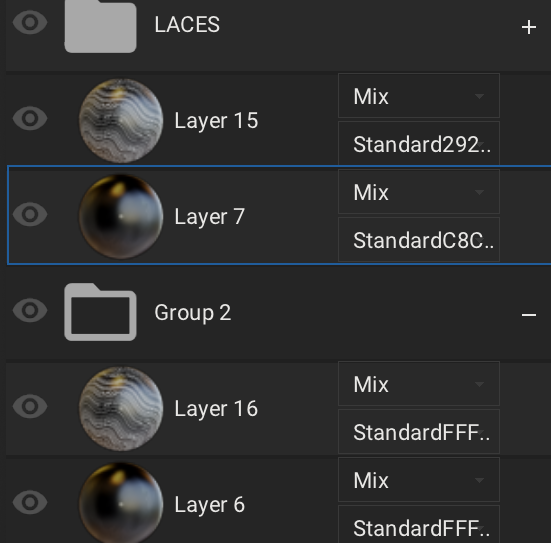
inconsistent/incorrect display and function of layers in groups
- Dominant language
- C
- Stars
- 5k
- Forks
- 553
- Avg merge
- 3d 11h
- Merged PRs (30d)
- 6
Description
*ArmorPaint 0.9-1bdd741, Windows*
**Issue description:**
the layers are displayed above the group after they have been dragged from the group, but if you minimize the group now, they are minimized as well (= they are still part of the Group 2).
**Steps to reproduce:**
a project with several layers has been created, these have been grouped together. if a layer from a lower group is now dragged upwards over the group, this layer is not removed from the group as mentioned above.

Contributor guide
No contributing guide indexed for this repository
Research direction
Reproduce the issue in ArmorPaint on Windows with several grouped layers, then drag a layer from a lower group above that group and minimize it. Trace the layer-group membership handling during the drag; done means the moved layer is no longer minimized with the group and remains independent after the group is collapsed.
Written by the indexing model from the issue text.
Assessment
- Tech stack
- c
- Domain
- computer-graphics, desktop
- Issue type
- Bug
- Difficulty
- 3/5
- Estimated time
- 1-2 days
- Activity status
- Stale
- Clarity
- Mostly clear
- Newbie friendliness
- 35/100