appsmithorg / appsmithorg/appsmith
[Feature]-[300]:As a developer, I should be able to access the hotkeys dialog, so that I can be informed of the various keyboard shortcuts in Appsmith
- Dominant language
- TypeScript
- Stars
- 40.9k
- Forks
- 4.8k
- Avg merge
- 1d 22h
- Merged PRs (30d)
- 45
Description
### Is there an existing issue for this?
- [X] I have searched the existing issues
### Summary
The hotkeys dialog can be accessed today by hitting keys "shift" and "/" together, but there are some changes that are needed to this.
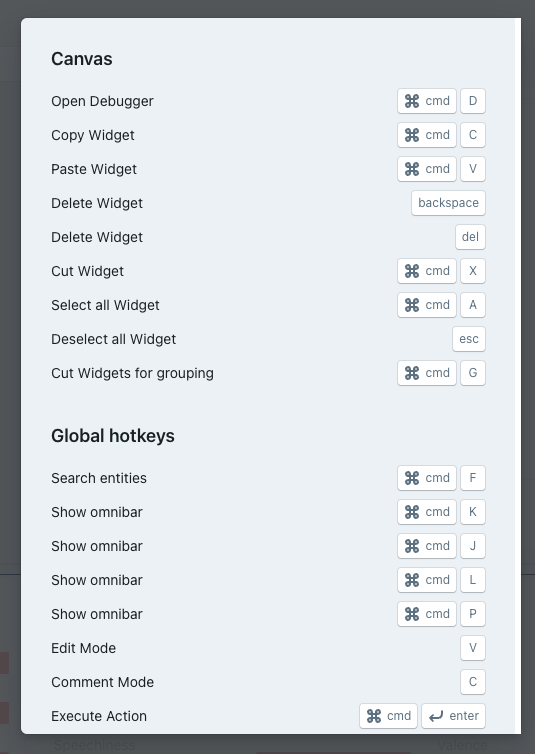
- [ ] 1. Change the key combination that invokes this dialog from "shift+/" to "cmd+/"(mac) and "ctrl+/"(windows). Today, the dialog can be invoked only from the canvas, but we plan to introduce hotkeys in the JS Editor as well, see #1751 and #9269 for details. When the user is in the editor, then the current key combination of "shift+/" is unsustainable because this maps to "?", which can be used in the editor.
- [ ] 2. Make the dialog context specific. Today, there are already two sections as you can see in the screenshot above. The first section can be dynamically shown, based on where the hotkey command is invoked.
- [ ] a. If I invoke "cmd+/" (or "ctrl+/") when I am in the canvas, I should see sections "Canvas Hotkeys" and "Global Hotkeys"
- [ ] b. If I invoke "cmd+/" (or "ctrl+/") when I am in the JS Editor, I should see sections "Editor Hotkeys" and "Global Hotkeys"
- [ ] c. If I invoke "cmd+/" (or "ctrl+/") when I am anywhere else in the application (datasources, queries, apis, pages etc.), I should see only the "Global Hotkeys"
- [ ] 3. What should be shown in the "Editor Hotkeys" will be dealt with in #1751 and #9269
**Design Consideration**
(will update this section with designs when available)
- [ ] 1. Educate the user about this feature.
- [ ] 2. Is the "cmd+/" the only way to access this dialog? Would a more sticky and visible action be warranted so that the user can more easily access it?
- [ ] 3. Shouldn't the dialog have a main heading as well?
### Why should this be worked on?
The hotkeys dialog is a "hidden feature" today, but almost every developer prefers using keyboard shortcuts to using the mouse/touchpad. Such seasoned users of Appsmith should be informed of the available hotkeys, and there should be an easy way to access the ready reckoner dialog.
Contributor guide
Assessment
This issue has not been assessed yet.