apollographql / apollographql/apollo-tooling
Avoid crashing the VSCode extension
- Dominant language
- TypeScript
- Stars
- 3k
- Forks
- 460
- PR merge metrics
- No merged PRs in 30d
Description
Hi. If there are issues with the GraphQL schema like say, 2 GQL queries using the same name, or invalid GQL file and so on, the extension reports the error, retries 3-4 times and crashes.
For eg. this is a valid error:
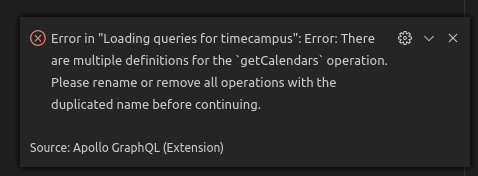
But when issues like this occur, this happens:

Related https://github.com/apollographql/apollo-tooling/issues/801#issuecomment-552200208
You can get it working again only after you restart VSCode. It would be great, if it shows the error but the extension does not crash so that I can fix the error but at the same time have it working for the remaining files.
Or, if that's not possible, atleast a way to restart the extension without closing the VSCode window since it is inconvenient to do that everytime. Hope this makes sense.
Thanks.
Contributor guide
Research direction
No source file, test, or entry point is named. Start by reproducing the crash in the VSCode extension with duplicate query names or an invalid GraphQL file, then trace the reported error and retries; done means schema errors are shown while the extension remains usable for the remaining files.
Written by the indexing model from the issue text.
Assessment
- Tech stack
- graphql, typescript
- Domain
- devtools
- Issue type
- Bug
- Difficulty
- 4/5
- Estimated time
- 3-5 days
- Activity status
- Stale
- Clarity
- Mostly clear
- Newbie friendliness
- 35/100