apache / apache/shardingsphere
Can not show logic tables when I config same actual table name in different storage unit
- Dominant language
- Java
- Stars
- 20.8k
- Forks
- 6.9k
- Avg merge
- 11h 38m
- Merged PRs (30d)
- 326
Description
## Bug Report
### Which version of ShardingSphere did you use?
[c20da72](https://github.com/apache/shardingsphere/commit/c20da72e9ecbe8302b7fcc0eb1a60dead97e4854)
### Which project did you use? ShardingSphere-JDBC or ShardingSphere-Proxy?
ShardingSphere-Proxy
### Expected behavior
Show all logic tables when I config same actual table name in different storage unit
### Actual behavior
Just show the first logic table now.
```
mysql> show tables like 't_order0';
+-----------------------+------------+
| Tables_in_sharding_db | Table_type |
+-----------------------+------------+
| t_order0 | BASE TABLE |
+-----------------------+------------+
1 row in set (0.00 sec)
```
### Reason analyze (If you can)
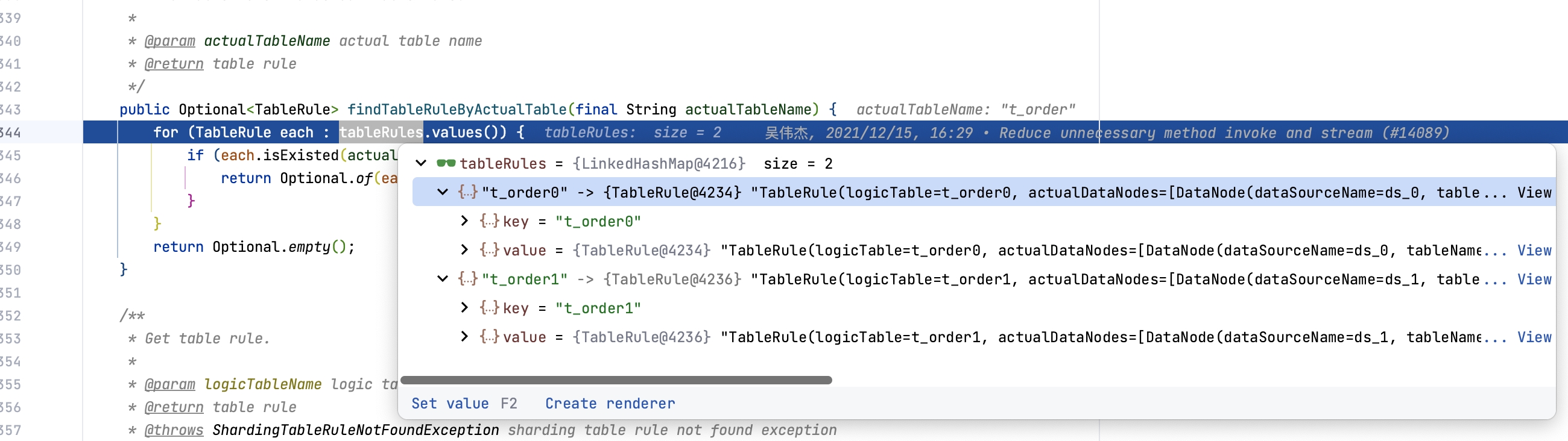
Then ShardingRule#findTableRuleByActualTable method just consider actual table now. When I config same actual table name in different storage unit, and establish different mapping relationships for actual tables, the logic will be wrong.
### Steps to reproduce the behavior, such as: SQL to execute, sharding rule configuration, when exception occur etc.
```yaml
databaseName: sharding_db
dataSources:
ds_0:
url: jdbc:mysql://127.0.0.1:3306/demo_ds_0?serverTimezone=UTC&useSSL=false
username: root
password: 123456
connectionTimeoutMilliseconds: 30000
idleTimeoutMilliseconds: 60000
maxLifetimeMilliseconds: 1800000
maxPoolSize: 50
minPoolSize: 1
ds_1:
url: jdbc:mysql://127.0.0.1:3306/demo_ds_1?serverTimezone=UTC&useSSL=false
username: root
password: 123456
connectionTimeoutMilliseconds: 30000
idleTimeoutMilliseconds: 60000
maxLifetimeMilliseconds: 1800000
maxPoolSize: 50
minPoolSize: 1
rules:
- !SHARDING
tables:
t_order0:
actualDataNodes: ds_0.t_order
t_order1:
actualDataNodes: ds_1.t_order
defaultDatabaseStrategy:
none:
defaultTableStrategy:
none:
```
And then execute following sqls:
```sql
-- execute in ds_0 and ds_1
CREATE TABLE `t_order` (
`order_id` bigint(20) NOT NULL,
`user_id` int(11) NOT NULL,
`status` varchar(50) NOT NULL,
`merchant_id` int(11) NOT NULL,
`remark` varchar(50) NOT NULL,
`creation_date` date NOT NULL,
PRIMARY KEY (`order_id`)
) ENGINE=InnoDB DEFAULT CHARSET=utf8mb4
mysql> show tables like 't_order0';
+-----------------------+------------+
| Tables_in_sharding_db | Table_type |
+-----------------------+------------+
| t_order0 | BASE TABLE |
+-----------------------+------------+
1 row in set (0.00 sec)
mysql> show tables like 't_order1';
Empty set (0.00 sec)
```
### Example codes for reproduce this issue (such as a github link).
Contributor guide
Assessment
This issue has not been assessed yet.