Subprojects not recognised unless in child directory of root project
- Dominant language
- Java
- Stars
- 3.1k
- Forks
- 935
- Avg merge
- 2d 3h
- Merged PRs (30d)
- 17
Description
### Apache NetBeans version
Apache NetBeans 17
### What happened
There are two projects `root` and `sub`, both of which resides in the same folder. `root` includes `sub`. On IDEs like IntelliJ IDEA, it correctly recognises project `root` with modules `main` and `sub`.
However, NetBeans does recognise that there is one subproject, but its name is not shown:
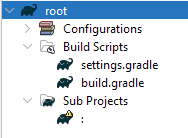
Double-click on that blank entry, and `sub` project will load, not as a subproject of project `root`, but as a standalone project (new root project).
This causes problems when there are extra properties, version catalogues, etc... that `root` and `sub` share, which are defined in `root`'s `build.gradle` or `settings.gradle`. The subproject does not recognise `root` as its parent project, therefore `root` configurations does not apply to `sub`, which causes `sub` configuration errors.
I realised that I can make `sub` project successfully recognise `root` as its parent project by moving `sub` folder into `root` folder and update `sub` project's path in `root`'s `settings.gradle`.
### How to reproduce
**Step 1**. Create this directory tree:
```
root/
├─ build.gradle
├─ settings.gradle
sub/
├─ build.gradle
```
root/settings.gradle
```
rootProject.name = 'root'
include ':sub'
project(':sub').projectDir = file('../sub')
```
root/build.gradle
```
plugins {
id 'java-library'
}
allprojects {
ext {
str = 'Hello'
}
}
dependencies {
project ':sub'
}
println ext.str.length()
```
sub/build.gradle
```
plugins {
id 'java-library'
}
println ext.str.length()
```
**Step 2**: Open project `root` by choosing `root` folder, and wait for project `root` to complete opening.
In `root`'s `Sub Projects`, there is a blank line which represents unsuccessfully realised `sub` project.
**Step 3**: Double-click on the blank line to open project `sub`.
NetBeans would notify that the project is unsuccessfully loaded as follows:

`sub` project's `Build Scripts` would also not have `root`'s `build.gradle`.
**Step 4**. Now, close those two projects.
**Step 5**. Move the folder `sub` into the folder `root` and change the content of `root/settings.gradle` as follows:
```
rootProject.name = 'root'
include ':sub'
project(':sub').projectDir = file('./sub')
```
The directory tree should be as follows:
```
root/
├─ build.gradle
├─ sub/
│ ├─ build.gradle
├─ settings.gradle
```
**Step 6**. Reopen `root` project.
Now, `sub` project is listed as a subproject `:root:sub` in `root`'s `Sub Projects`
### Did this work correctly in an earlier version?
No / Don't know
### Operating System
Windows 11 Home (Build 22623.1037)
### JDK
Oracle JDK 17 "17.0.6" 2023-01-17 LTS
### Apache NetBeans packaging
Apache NetBeans provided installer
### Anything else
_No response_
### Are you willing to submit a pull request?
No
Contributor guide
Research direction
Reproduce the issue with root/settings.gradle, root/build.gradle, and the external sub/build.gradle described in the report, then inspect how NetBeans populates the root project's Sub Projects entry. Compare the external projectDir case with the nested ./sub case; done means the external subproject is named, opens under root, and inherits root's build script configuration.
Written by the indexing model from the issue text.
Assessment
- Tech stack
- java
- Domain
- build-system, tooling
- Issue type
- Bug
- Difficulty
- 4/5
- Estimated time
- 3-5 days
- Activity status
- Stale
- Clarity
- Mostly clear
- Newbie friendliness
- 35/100