[Discussion] Should Maka add a Codex-inspired Pull Requests workspace?
- Dominant language
- TypeScript
- Stars
- 5.4k
- Forks
- 502
- Avg merge
- 1d 2h
- Merged PRs (30d)
- 715
Description
## Discussion
Should Maka Desktop introduce a dedicated **Pull Requests workspace**, inspired by the Codex UI, to help users discover, inspect, and follow up on PRs without leaving their agent workspace?
This issue is intended to discuss the value, product fit, and scope before committing to implementation.
## Problem
Coding work does not end when an agent finishes a task or creates a PR. Users still need to find their changes, check review progress, respond to feedback, and reconnect a PR with the task and local project that produced it. Across several repositories or concurrent tasks, this can mean repeatedly switching between the agent application, browser tabs, and local checkouts.
A conversation list organizes agent sessions, but does not by itself answer: **Which PR needs my attention next?**
## Reference interaction
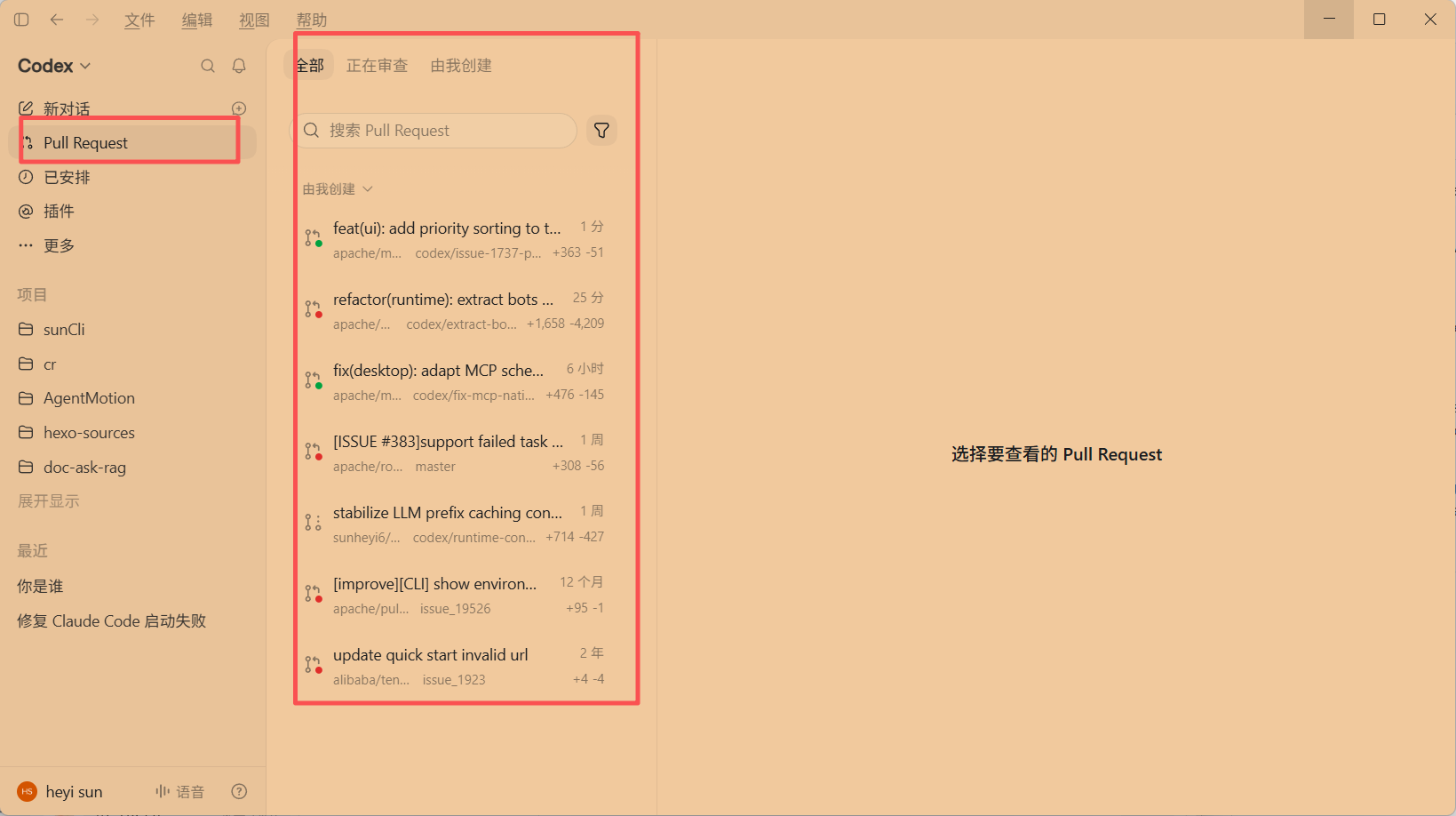
The reference Codex UI shows:
- A dedicated **Pull Request** entry in the main sidebar.
- Views for **All**, **Under review**, and **Created by me**.
- Search and filtering within the PR list.
- Compact rows with a PR title, repository/branch context, status indicators, recency, and additions/deletions.
- A list-and-detail layout, with a right-hand area for the selected PR.
These are observations from the reference screenshot. The workflow extensions below are proposals for Maka, not claims about capabilities demonstrated by that screenshot.
## Why this could be useful
- **Less context switching:** provide one place to find a PR and inspect its essential context, while retaining an easy link to GitHub for full functionality.
- **A clearer attention queue:** distinguish authored PRs from review work, and potentially surface failing checks or requested changes so users can decide what to address next.
- **Continuity between implementation and review:** where a reliable association exists, link a PR to its Maka task and local project so users can resume work with the original context instead of reconstructing it.
- **Better visibility across parallel work:** help users track several agent-produced changes or repositories without searching through individual conversations.
- **A concrete entry point for agent assistance:** after selecting a PR, users could explicitly ask Maka to explain the diff, investigate a failing check, or prepare fixes for review feedback.
For example: a user finishes several coding tasks, opens the PR workspace, finds a PR that needs follow-up, and returns to the associated task to prepare a fix.
## Possible first iteration
Start with a small, read-only GitHub integration:
1. A Pull Requests entry scoped to explicitly connected or selected repositories.
2. A searchable list, basic state/repository filters, and a “Created by me” view. Define review-related views precisely before adding them.
3. A detail view with description, branches, change summary, available check/review status, and **Open on GitHub**.
4. A link to an existing Maka task/project when the association is known; do not guess when it is ambiguous.
5. Clear loading, empty, authentication, error, and stale-data states, plus manual refresh.
Submitting reviews, posting comments, merging, automatic checkout, and autonomous fixes can remain outside the initial scope. Any later remote write or local checkout should require an explicit user action and follow Maka's permission model.
## Trade-offs and alternatives
The benefits come with authentication and private-repository permission handling, API rate limits, refresh/caching logic, and ongoing UI maintenance. Remote PR data should be opt-in, and stale information should be clearly marked.
Alternatives include continuing to use GitHub in the browser or through CLI/tools, adding a small PR card to individual tasks, or starting with a project-level PR panel instead of a global sidebar destination. These may deliver enough value with less complexity.
## Questions for discussion
- Is a dedicated PR workspace valuable enough for Maka's core workflow to justify a new top-level entry?
- Should the first version be project-scoped or aggregate selected repositories?
- What should “Under review” mean: PRs awaiting my review, my PRs awaiting others, or separate views?
- Is a read-only list/detail view with GitHub links sufficient initially, or is task association essential to its value?
- Should this live in the core desktop experience or an optional integration?
A useful outcome for this discussion would be agreement on whether to pursue the feature and, if so, the smallest scope that meaningfully improves PR follow-up.
---
中文说明(点击展开)
## 讨论目标
是否要参考 Codex 的界面,在 Maka Desktop 中增加一个独立的 **Pull Requests 工作区**,让用户可以在 Agent 工作区内集中查找、查看和跟进 PR?
本 issue 先讨论价值、产品定位和范围,不代表已经决定实现。
## 问题背景
Agent 完成任务或创建 PR 后,开发流程并没有结束。用户仍然需要查看审查进度、处理反馈,并找到这个 PR 对应的原始任务和本地项目。当多个仓库、多个任务并行时,用户往往需要在 Agent 应用、浏览器和本地工作目录之间反复切换。
会话列表可以组织任务,但不能直接回答:**下一个需要我处理的 PR 是哪个?**
## 参考交互
参考截图中,Codex 提供了侧边栏 Pull Request 入口、“全部 / 正在审查 / 由我创建”视图、搜索和筛选,以及展示标题、仓库/分支、状态标识、时间和增删行数的列表,右侧预留所选 PR 的详情区域。
以上仅描述截图中可见的交互。下面的任务关联、检查状态和 Agent 辅助等内容是对 Maka 的建议,不是对截图未展示功能的推断。
## 可能带来的好处
- **减少切换成本**:在一个入口找到 PR 并了解基本情况,完整操作仍可跳转 GitHub。
- **更清晰的待办视图**:区分自己创建的 PR 和审查任务;后续可以展示检查失败、需要修改等信息,帮助用户判断处理顺序。
- **衔接开发与审查**:有可靠关联时,直接回到 PR 对应的 Maka 任务和本地项目,保留原始需求与实现上下文。
- **方便管理并行工作**:集中跟踪多个任务或仓库产生的 PR,减少逐个翻找会话。
- **为 Agent 辅助提供明确入口**:选中具体 PR 后,用户可以主动要求解释差异、排查检查失败或针对审查意见准备修复。
例如:用户完成几个开发任务后,打开 PR 工作区,找到需要跟进的 PR,再回到关联任务准备修复。
## 可讨论的最小版本
先做只读 GitHub 集成:面向用户明确连接或选定的仓库,提供 PR 列表、搜索、基础状态/仓库筛选和“由我创建”视图;详情展示描述、分支、改动摘要及可获取的检查/审查状态,并保留“在 GitHub 打开”。审查相关视图需要先明确语义。
仅在关联可靠时提供返回 Maka 任务/项目的入口,不能确定时不猜测。需要覆盖加载、空列表、认证失败、其他错误和数据过期状态,并支持手动刷新。
首版不必包含提交审查、发表评论、合并、自动切换分支或自动修复。后续涉及远程写入或本地切换的操作,应由用户明确触发,并遵循 Maka 的权限模型。
## 成本与替代方案
需要考虑认证、私有仓库权限、API 限流、刷新和缓存,以及长期界面维护成本。远程 PR 数据应由用户选择接入,过期信息应明确标识。
替代方案包括继续通过浏览器或 CLI/工具使用 GitHub、先在任务中增加轻量 PR 卡片,或者先做项目内 PR 面板,再决定是否需要全局入口。
## 希望讨论的问题
- 这项能力是否足够贴合 Maka 的核心流程,值得增加一级入口?
- 首版应该限定当前项目,还是聚合用户选定的多个仓库?
- “正在审查”是指等待我审查、我创建且等待他人审查,还是应该拆成不同视图?
- 只读列表、详情与 GitHub 跳转是否已经有价值,还是任务关联才是关键?
- 应该作为桌面核心能力,还是可选集成?
希望先就“是否值得做”达成共识;如果值得,再确定真正改善 PR 跟进体验的最小范围。
Contributor guide
Research direction
No implementation file or test is named. Start by reviewing the open questions, proposed read-only scope, alternatives, and authentication or permission constraints; done means agreement on whether to pursue the workspace and a smallest defined scope before implementation begins.
Written by the indexing model from the issue text.
Assessment
- Tech stack
- electron, github, typescript
- Domain
- api, desktop, devtools
- Issue type
- Feature
- Difficulty
- 5/5
- Estimated time
- Over a week
- Activity status
- Active
- Clarity
- Needs clarification
- Newbie friendliness
- 25/100