Auto-Correlation as core functionality in JMeter
- Dominant language
- Java
- Stars
- 9.5k
- Forks
- 2.3k
- Avg merge
- 1d 22h
- Merged PRs (30d)
- 5
Description
**Takashi Imoto** ([Bug 63640](https://bz.apache.org/bugzilla//show_bug.cgi?id=63640&redirect=false)):
Purpose:
If a JMeter script has API parameters that require correlation, then the User needs to manually correlate them using JMeter Post-Processors. This becomes a hassle when the test scenarios are very large.
Manual procedure of Correlation has following steps:
-Identify API parameters that require Correlation.
-Create "Regular Expression Extractor" by analysing API response.
-Modify the script by setting "Regular Expression Extractor" names wherever correlated parameters are used.
Manual Auto-Correlation leads to following problem:
-Increased complexity.
-Time-consuming.
-Error-prone.
Solution:
Record same senario 2 times.
Comparing these 2 scripts, it can be seen that a value with a difference variable may be a correlation variable.
Automate the following steps which are involved in the correlation process.
-Identify the parameters which are candidates for correlation by comparing 2 scripts.
-Create "Regular Expression Extractor" by analysing API response.
-Add "Regular Expression Extractor" into the script.
Solution Design:
Abbreviations:
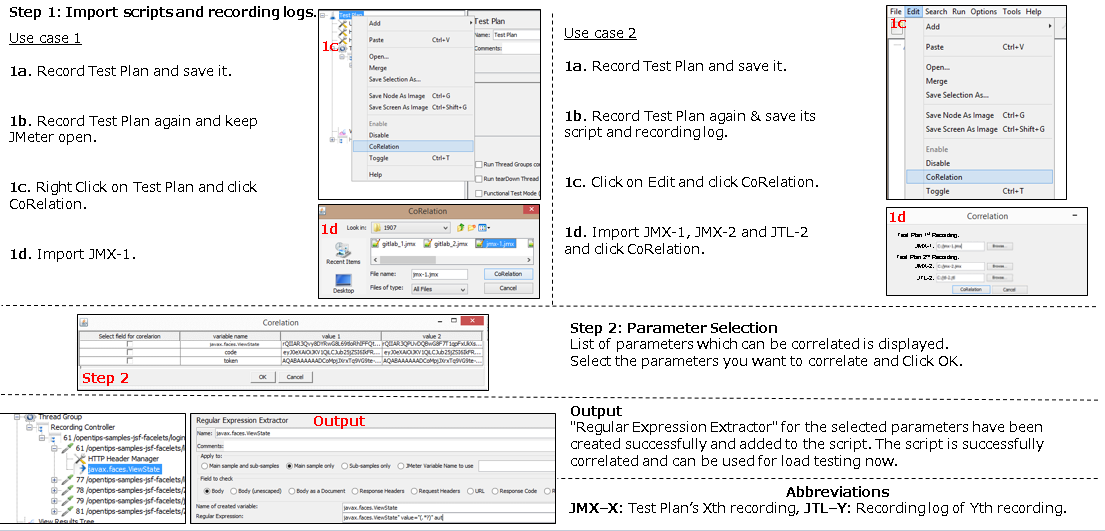
-JMX–X: Test Plan Xth recording.
-JTL–Y: Recording log of Yth recording.
-Test-Engineer: Person who records the test plan.
-Test-Designer: Person who can perform manual Correlation in JMeter.
Use-Case:
There are two use cases being considered:
1. The Test Designer records the test plan and performs the Correlation himself. In this use case the test plan is kept in JMeter memory along with recording's logs.
2. The Test-Engineer records the test plan and Test-Designer performs the Correlation. In this use case Test-Engineer saves test plans and its recordings and shares them to the Test-Designer for selecting the appropriate parameters which are required to be correlated.
Procedure
* Refer attached screen images.
Step 1: Import scripts and recording logs.
Use case 1
1a. Record Test Plan and save it.
1b. Record Test Plan again and keep JMeter open.
1c. Right Click on Test Plan and click CoRelation.
1d. Import JMX-1.
Use case 2
1a. Record Test Plan and save it.
1b. Record Test Plan again & save its script and recording log.
1c. Click on Edit and click CoRelation.
1d. Import JMX-1, JMX-2 and JTL-2 and click CoRelation.
Step 2: Parameter Selection
List of parameters which can be correlated is displayed.
Select the parameters you want to correlate and Click OK.
Output
"Regular Expression Extractor" for the selected parameters have been created successfully and added to the script. The script is successfully correlated and can be used for load testing now.
Please refer to attached file for more details.
And we already prepare the prototype to confirm of our approach for Use case 1.
If community interest it, our company will submit PR of this.
Created attachment [auto_colleration.png](https://apache.github.io/jmeter-bugzilla-attachments/40/63640/36704/auto_colleration.png): Use cases of Auto Correlation
Votes in Bugzilla: 2
OS:
Contributor guide
Assessment
This issue has not been assessed yet.