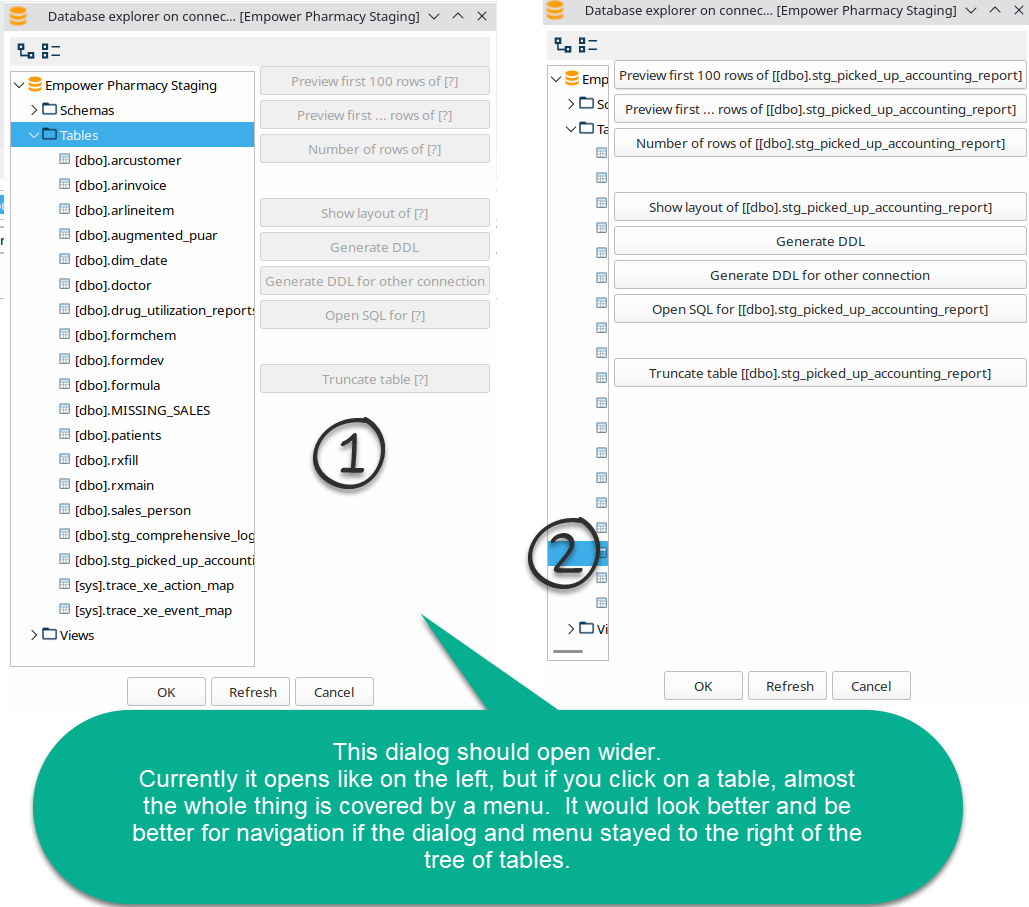
[Task]: Explore Database Panel needs to accommodate buttons when clicking on a table.
- Dominant language
- Java
- Stars
- 1.5k
- Forks
- 476
- Avg merge
- 18h 32m
- Merged PRs (30d)
- 216
Description
### What needs to happen?
Import: https://issues.apache.org/jira/browse/HOP-4569
The database explorer starts off relatively small. If you leave it alone and click on a table, the resultant menu nearly covers the whole dialog and you cannot really "X" out or cancel the menu. It would probably be better if the buttons stayed to the right of the object explorer tree. – Shows this way on Hop 2.2.0 - 2022-11-05 build.
### Issue Priority
Priority: 3
### Issue Component
Component: Hop Gui
Contributor guide
Research direction
Reproduce the issue in the Hop Gui database explorer by opening a table while the explorer is at its initial small size, then inspect the layout used for the object explorer and its resulting menu. Done means the buttons remain to the right of the tree and the dialog can still be cancelled or closed.
Written by the indexing model from the issue text.
Assessment
- Tech stack
- java
- Domain
- desktop
- Issue type
- Bug
- Difficulty
- 3/5
- Estimated time
- 1-2 days
- Activity status
- Stale
- Clarity
- Mostly clear
- Newbie friendliness
- 45/100