🐛 [BUG]pie,环图,svg渲染,legend-item:mouseenter响应不及时,以及flippage:true,分页切换,点击下一页,再点击上一页,legend回不到第一页
- Dominant language
- TypeScript
- Stars
- 2.7k
- Forks
- 591
- PR merge metrics
- No merged PRs in 30d
Description
### 🐛 pie,环图,svg渲染模式,legend-item:mouseenter响应不及时,分页不正常
import React, { useState, useEffect } from 'react';
import ReactDOM from 'react-dom';
import { Pie, measureTextWidth } from '@ant-design/plots';
const DemoPie = () => {
function renderStatistic(containerWidth, text, style) {
const { width: textWidth, height: textHeight } = measureTextWidth(text, style);
const R = containerWidth / 2; // r^2 = (w / 2)^2 + (h - offsetY)^2
let scale = 1;
if (containerWidth < textWidth) {
scale = Math.min(Math.sqrt(Math.abs(Math.pow(R, 2) / (Math.pow(textWidth / 2, 2) + Math.pow(textHeight, 2)))), 1);
}
const textStyleStr = `width:${containerWidth}px;`;
return `
}
const data = [
{
type: '分类一',
value: 27,
},
{
type: '分类二',
value: 25,
},
{
type: '分类三',
value: 18,
},
{
type: '分类四',
value: 15,
},
{
type: '分类五',
value: 10,
},
{
type: '其他',
value: 5,
},
];
const config = {
appendPadding: 10,
data,
angleField: 'value',
colorField: 'type',
renderer: 'svg',
radius: 1,
innerRadius: 0.64,
meta: {
value: {
formatter: (v) => `${v} ¥`,
},
},
label: {
type: 'inner',
offset: '-50%',
style: {
textAlign: 'center',
},
autoRotate: false,
content: '{value}',
},
statistic: {
title: {
offsetY: -4,
customHtml: (container, view, datum) => {
const { width, height } = container.getBoundingClientRect();
const d = Math.sqrt(Math.pow(width / 2, 2) + Math.pow(height / 2, 2));
const text = datum ? datum.type : '总计';
return renderStatistic(d, text, {
fontSize: 28,
});
},
},
content: {
offsetY: 4,
style: {
fontSize: '32px',
},
customHtml: (container, view, datum, data) => {
const { width } = container.getBoundingClientRect();
const text = datum ? `¥ ${datum.value}` : `¥ ${data.reduce((r, d) => r + d.value, 0)}`;
return renderStatistic(width, text, {
fontSize: 32,
});
},
},
},
legend: {
position: 'right',
offsetX: -10,
flipPage: true,
pageNavigator: {
marker: {
style: {
// 非激活,不可点击态时的填充色设置
inactiveFill: 'rgba(255, 255, 255, 0.4)',
inactiveOpacity: 0.45,
// 默认填充色设置
fill: 'rgba(255, 255, 255, 0.8)',
opacity: 0.8,
},
},
},
maxItemWidth:60,
itemHeight: 20,
marker: {
style: (oldStyle) => {
return {
...oldStyle,
r: 4,
lineWidth: 2,
fillOpacity: 1,
// square marker 只有填充色,赋给 line 的 stroke
stroke: oldStyle.stroke || oldStyle.fill,
};
},
},
itemName: {
style: {
fill: '#f00',
},
formatter: () => {
return 'ceshishiushishsihsishishsihsihsihsh';
},
},
},
// 添加 中心统计文本 交互
interactions: [
{
type: 'element-selected',
},
{
type: 'element-active',
},
{
type: 'pie-statistic-active',
},
],
};
return {
// console.log('chart',chart)
pie.on('legend-item:mouseenter', (evt: any) => {
// console.log('ddd',evt);
});
pie.on('legend-item:mouseleave', () => {
});
}}/>;
};
ReactDOM.render(, document.getElementById('container'));
### 📷 Step to reproduce
### 🏞 Expected result
1、mouseenter能响应及时,因为我需要鼠标移到对应的legend-item有特定的动画
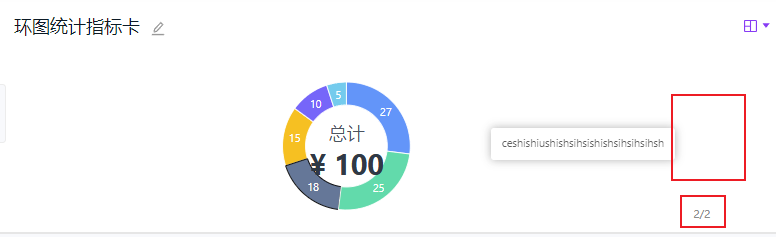
2、legend分页切换正常显示
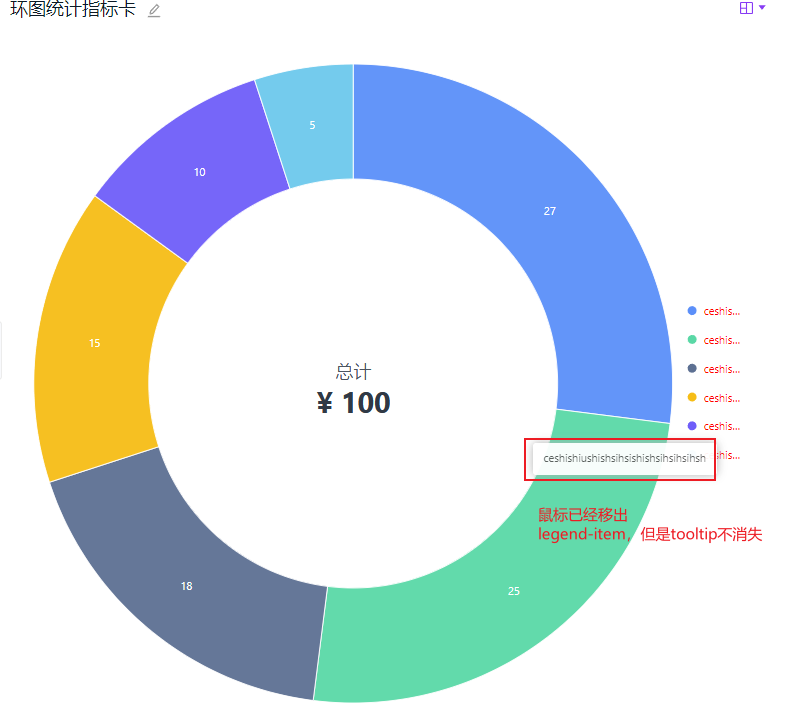
3、当legend-item设置了最大的宽度时,超过对应的宽度鼠标移上去能有tooltip内容,移开就消失
### 🚑 Any additional [like screenshots]
* **G2Plot Version**:"@ant-design/charts": "^1.3.6",
"@ant-design/icons": "^4.6.4",
"@ant-design/plots": "^1.0.9",
* **Platform**:React
Contributor guide
Research direction
Start from the React Pie reproduction using SVG rendering, the legend-item mouseenter handlers, flipPage pagination, and maxItemWidth. Reproduce the delayed hover response, incorrect page navigation, and missing overflow tooltip behavior. Done means legend hover responds promptly, pagination returns to the correct page, and truncated legend items show and hide their tooltip correctly.
Written by the indexing model from the issue text.
Assessment
- Tech stack
- react, typescript
- Domain
- data-visualization, frontend
- Issue type
- Bug
- Difficulty
- 4/5
- Estimated time
- 3-5 days
- Activity status
- Stale
- Clarity
- Mostly clear
- Newbie friendliness
- 35/100