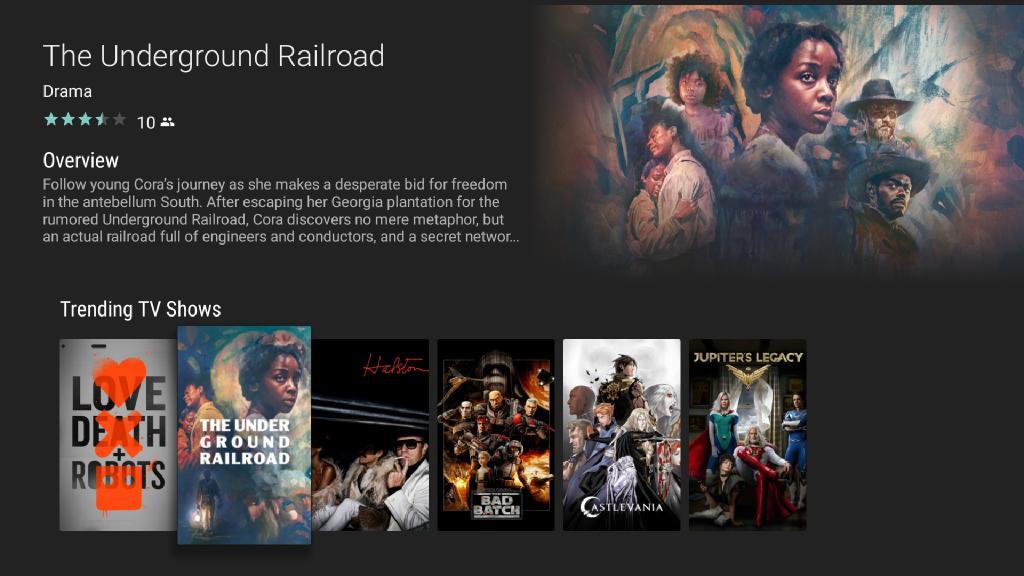
How to customize BrowseSupportFragment to show text and image preview above Row list
- Dominant language
- Kotlin
- Stars
- 1.3k
- Forks
- 396
- PR merge metrics
- No merged PRs in 30d
Description
Now the problem is how to design the preview section in the top with a combination of Text and the Program poster as the BrowseFragment shows the Rows from the top left corner of the screen.
Do we need to use our customization or we can just use any of the Leanback library Fragment/Class/Activity?
Contributor guide
Research direction
Start by reading the BrowseSupportFragment entry point and the available Leanback Fragment, Class, and Activity APIs mentioned in the issue. Determine whether they support the requested text-and-poster preview above the Rows, and identify the relevant tv-samples example if one exists. Done means the customization approach is established and demonstrated or documented.
Written by the indexing model from the issue text.
Assessment
- Tech stack
- android, kotlin
- Domain
- mobile-dev
- Issue type
- Feature
- Difficulty
- 5/5
- Estimated time
- Over a week
- Activity status
- Stale
- Clarity
- Needs clarification
- Newbie friendliness
- 25/100