使用mysqlreader和mysqlwriter的时候,注意fastjson2的版本
- Dominant language
- Java
- Stars
- 17.4k
- Forks
- 5.7k
- PR merge metrics
- No merged PRs in 30d
Description
1、背景:很简单的本地mysql的读入写进。
2、问题:test.json文件已经确定是正确的json格式了,但是在idea的控制台日志中会发现解析出来的json多了一个逗号。

3、报错日志如下:
com.alibaba.datax.common.exception.DataXException: Code:[Common-00], Describe:[您提供的配置文件存在错误信息,请检查您的作业配置 .] - 配置信息错误. 您提供的配置信息不是合法的JSON格式: offset 40, character ,, line 1, column 41, fastjson-version 2.0.15 {"username":"root","password":"123456",,"fetchSize":-2147483648,"isTableMode":false,"tableNumber":0,"jdbcUrl":"jdbc:mysql://127.0.0.1:3310/test_01?characterEncoding=UTF-8&useUnicode=true&useSSL=false&tinyInt1isBit=false&allowPublicKeyRetrieval=true&serverTimezone=Asia/Shanghai&yearIsDateType=false&zeroDateTimeBehavior=convertToNull&tinyInt1isBit=false&rewriteBatchedStatements=true","loadBalanceResourceMark":"127.0.0.1"} . 请按照标准json格式提供配置信息.
at com.alibaba.datax.common.exception.DataXException.asDataXException(DataXException.java:30)
at com.alibaba.datax.common.util.Configuration.(Configuration.java:1075)
at com.alibaba.datax.common.util.Configuration.from(Configuration.java:79)
at com.alibaba.datax.common.util.Configuration.clone(Configuration.java:703)
at com.alibaba.datax.plugin.rdbms.reader.util.ReaderSplitUtil.doSplit(ReaderSplitUtil.java:103)
at com.alibaba.datax.plugin.rdbms.reader.CommonRdbmsReader$Job.split(CommonRdbmsReader.java:103)
at com.alibaba.datax.plugin.reader.mysqlreader.MysqlReader$Job.split(MysqlReader.java:49)
at com.alibaba.datax.core.job.JobContainer.doReaderSplit(JobContainer.java:733)
at com.alibaba.datax.core.job.JobContainer.split(JobContainer.java:394)
at com.alibaba.datax.core.job.JobContainer.start(JobContainer.java:117)
at com.alibaba.datax.core.Engine.start(Engine.java:86)
at com.alibaba.datax.core.Engine.entry(Engine.java:168)
4、解决办法:修改pom文件中的fastjson2版本号就可以

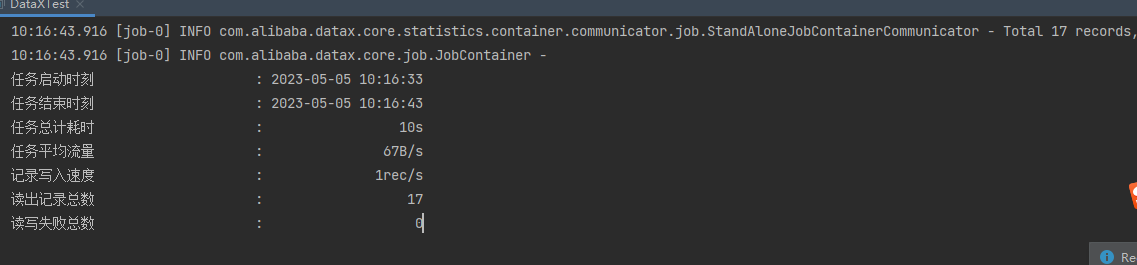
5、成功日志:
Contributor guide
No contributing guide indexed for this repository
Research direction
Review the pom file and the mysqlreader/mysqlwriter dependency setup, starting with the fastjson2 version implicated in the issue. Reproduce the local MySQL read/write configuration and verify whether the generated JSON contains the extra comma; done means the configuration parses successfully and the job completes without the reported error.
Written by the indexing model from the issue text.
Assessment
- Tech stack
- java, mysql
- Domain
- database
- Issue type
- Bug
- Difficulty
- 3/5
- Estimated time
- 1-2 days
- Activity status
- Stale
- Clarity
- Mostly clear
- Newbie friendliness
- 35/100