alanshaw / alanshaw/markdown-pdf
PDF issue with paperBorder to 0
- Langage dominant
- JavaScript
- Étoiles
- 2.9k
- Forks
- 253
- Métriques de merge des PR
- Aucune PR mergée en 30 j
Description
Hi Team,
I encounters an issue with document PDF top border.
I set all page borders1 to 0 to manage them with the CSS Stylesheet.
1 : Using option `--paper-border "0cm"`
I try to set a header on the absolute top of the page but nothing works.
Please find the command line which used to generated the PDF 👍
```
markdown-pdf -m '{"breaks": false, "html": true, "linkyfy": true}' -f "A4" --paper-border "0cm" --css-path ~/$sheet --highlight-css-path ~/$hljssheet $run $mdfile
```
Please find the JavaScript use for option `runnings-path` :
```js
/**
* PDF à 100% sur 1920x1080px
* 1.2 cm = 40.00px
* 1.0 cm = 33.33px
* 1.0 mm = 3.33px
* 1.0rem = 19.00px
* 4.0rem = 74.00px
* 0.1rem = 1.85px
*/
exports.header = {
height: '0.5cm',
contents: function(pageNum, numPages) {
//if (pageNum === 1) {return "";}
return "
"\n" +
"\n" +
"\n" +
"
}
}
```
Result :
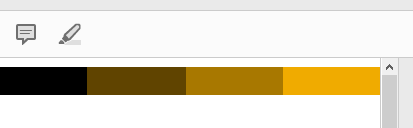
I tried to change `body` margins and paddings.
I tried to set a negative value for my div return in JavaScript file with `top: -0.5rem`.
Negative position move the block, but it disapeared has it was in parent node with "`overflow: hidden`" applied :
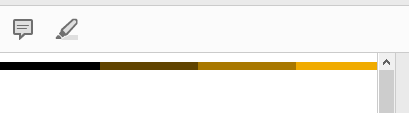
I had the same problem with footer but negative position works.
I tried many hack but nothing works.
Global result between two page :

Can you help me ?
Kindly Regards,
Nicolas D.
Guide de contribution
Aucun guide de contribution indexé pour ce dépôt
Évaluation
Cette issue n'a pas encore été évaluée.