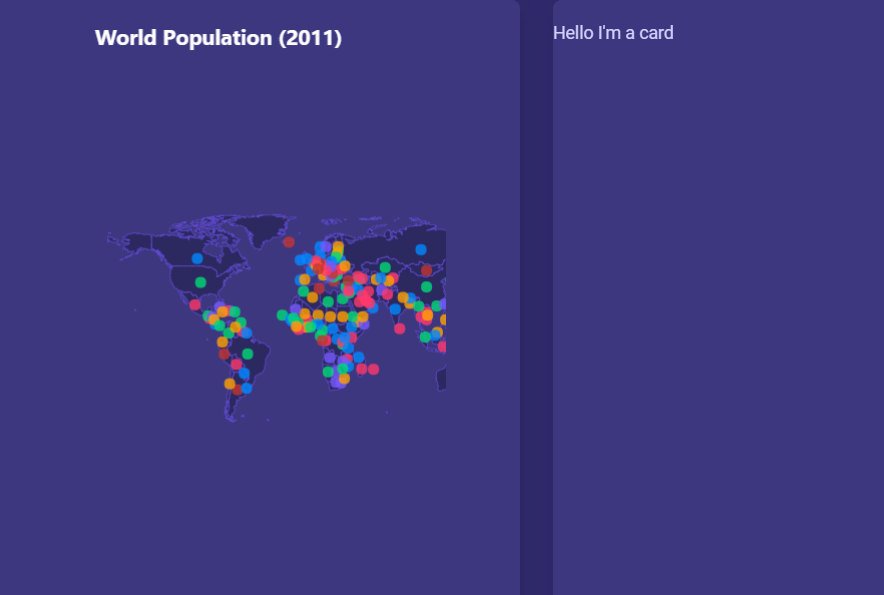
Bubble maps on cards causes a css issue (missing right hand size and scroll bar)
未关闭
question
- 主要语言
- TypeScript
- 星标
- 25.7k
- 派生
- 7.9k
- PR 合并指标
- 30 天内没有已合并 PR
描述
Hi There,
Thanks for such a great dashboard/admin template, it's very nice.
I've noticed when you put the bubble map in a card, and try and line another card in the same row, it seems to cut off the right hand side of the map. If you resize the screen it seems to refresh itself and display properly. Does anyone know what is causing this and how it can be resolved?
Also if fix the card size to size="large" then I end up with the map over-scrolling the bottom card (i.e. end up with a scroll bar on the right hand side). How do i just get the map canvas to fit to the card?
Thanks in advance.
贡献指南
评估
这个 Issue 还没有评估数据。