ageitgey / ageitgey/face_recognition
face_landmarks API gives invalid points when using with face_location info
Nobody has claimed this yet.
- Dominant language
- Python
- Stars
- 56.8k
- Forks
- 13.7k
- PR merge metrics
- No merged PRs in 30d
Description
- face_recognition version: 1.2.3 (master)
- Python version: 3.6.8
- Operating System: Ubuntu 16.04
Description
Describe what you were trying to get done.
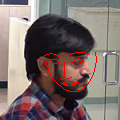
I am trying to filter face images with eyes and nose visible. To do this, I thought of using face_landmarks API. But I am finding for some images (side face) results are different and invalid if I provide face_locations to face_landmarks API.
Please find attached images for reference.
What I Did
For example, for a side face image:
face_landmarks_list = face_recognition.face_landmarks(image)
$ python find_facial_features_in_picture.py original.jpeg
I found 0 face(s) in this photograph.
returns with no landmarks findings. But with following API call
face_landmarks_list = face_recognition.face_landmarks(image, face_locations=face_bounding_boxes)
$ python find_facial_features_in_picture.py original.jpeg
I found 1 face(s) in this photograph.
The chin in this face has the following points: [(45, 58), (46, 64), (48, 69), (50, 75), (53, 79), (57, 83), (62, 87), (66, 90), (71, 91), (77, 91), (82, 88), (87, 84), (91, 78), (93, 73), (95, 66), (96, 59), (95, 52)]
The left_eyebrow in this face has the following points: [(44, 55), (47, 54), (51, 53), (55, 54), (59, 56)]
The right_eyebrow in this face has the following points: [(67, 55), (72, 53), (78, 52), (83, 52), (88, 54)]
The nose_bridge in this face has the following points: [(64, 62), (64, 67), (64, 71), (64, 76)]
The nose_tip in this face has the following points: [(60, 78), (62, 79), (65, 79), (68, 78), (71, 77)]
The left_eye in this face has the following points: [(49, 60), (52, 59), (56, 59), (58, 62), (55, 63), (51, 63)]
The right_eye in this face has the following points: [(72, 62), (75, 59), (79, 58), (83, 60), (80, 62), (76, 63)]
The top_lip in this face has the following points: [(61, 83), (63, 83), (65, 83), (66, 84), (68, 83), (72, 83), (78, 82), (76, 82), (69, 85), (67, 85), (65, 85), (62, 83)]
The bottom_lip in this face has the following points: [(78, 82), (74, 84), (70, 85), (68, 85), (66, 85), (64, 84), (61, 83), (62, 83), (66, 81), (67, 82), (69, 81), (76, 82)]
I got face landmarks which are completely invalid points on face.

Contributor guide
First steps
- Read the whole issue, then the project's contributing guide.
- Comment on the issue to say you are picking it up — it saves two people doing the same work.
- Fork the repository and make your change on a branch.
- Open a pull request that references the issue number.
Research direction
Start by running the attached find_facial_features_in_picture.py reproduction with the provided images, comparing face_recognition.face_landmarks(image) against the call that supplies face_locations. Trace how those two API paths handle the reported side-face case. Done means the discrepancy has a reproducible diagnosis and a verified correction or documented limitation.
Written by the indexing model from the issue text.
Assessment
- Tech stack
- python
- Domain
- computer-vision
- Issue type
- Bug
- Difficulty
- 4/5
- Estimated time
- 3-5 days
- Activity status
- Stale
- Clarity
- Mostly clear
- Newbie friendliness
- 35/100