adoptium / adoptium/adoptium-support
Swing app problems with GUI scaling in Windows
- Dominant language
- No language data
- Stars
- 59
- Forks
- 13
- PR merge metrics
- No merged PRs in 30d
Description
## Steps to reproduce
I'm using Windows Preferences -> System -> Display -> Scale
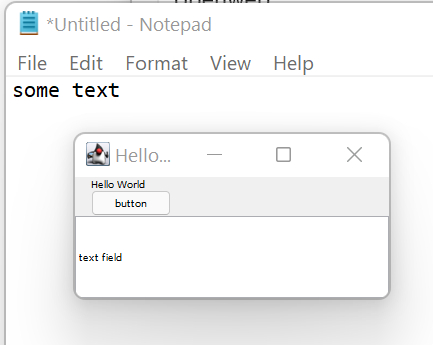
When I set it to 150% and then start my sample app, the fonts are very small:
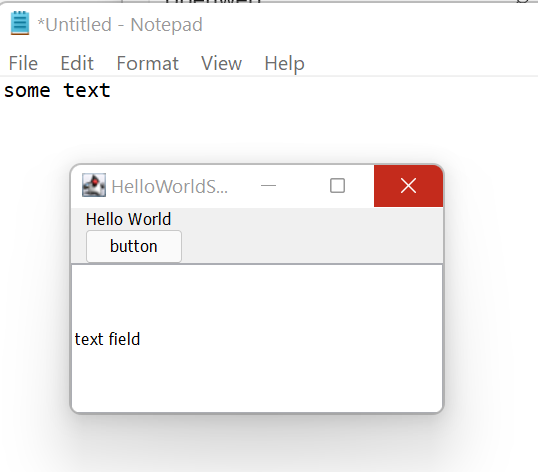
Interestingly, when I start the app with scale set to 100% and then change the scale to 150%, it looks good:
Attaching the sample app code: [MyTest.java.txt](https://github.com/adoptium/adoptium-support/files/7554971/MyTest.java.txt)
## Triaging info
Java version:
openjdk version "11.0.13" 2021-10-19
OpenJDK Runtime Environment Temurin-11.0.13+8 (build 11.0.13+8)
OpenJDK 64-Bit Server VM Temurin-11.0.13+8 (build 11.0.13+8, mixed mode)
What is your operating system and platform?
Windows 11 Pre 21H2 on x86-64
Also occurs in Windows 10
How did you install Java?
installer package - MSI
Contributor guide
Research direction
Start with the attached MyTest.java sample and reproduce the behavior on Windows 10 or Windows 11 using Temurin 11.0.13, first launching at 150% scaling and then changing from 100% to 150%. Investigate the difference in startup behavior; done means Swing fonts render appropriately when the application starts while Windows display scaling is already set to 150%.
Written by the indexing model from the issue text.
Assessment
- Tech stack
- java
- Domain
- desktop, operating-systems
- Issue type
- Bug
- Difficulty
- 4/5
- Estimated time
- 3-5 days
- Activity status
- Stale
- Clarity
- Mostly clear
- Newbie friendliness
- 25/100