adobe / adobe/aem-angular-core-wcm-components-spa
[bug]AEM SPA is not working with Angular 11 version
- Dominant language
- TypeScript
- Stars
- 3
- Forks
- 3
- PR merge metrics
- No merged PRs in 30d
Description
**Describe the bug**
AEM SPA is not working with Angular 11.
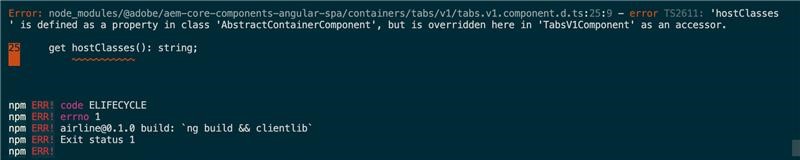
The project structure code had been set up using archetype 27 (angular as a front end). It comes up with the default angular version of 7. There is a requirement in our project to upgrade to angular 11. However, there is a build error(please refer to the screenshot section for the error detail) after the upgrade.
**Package version**
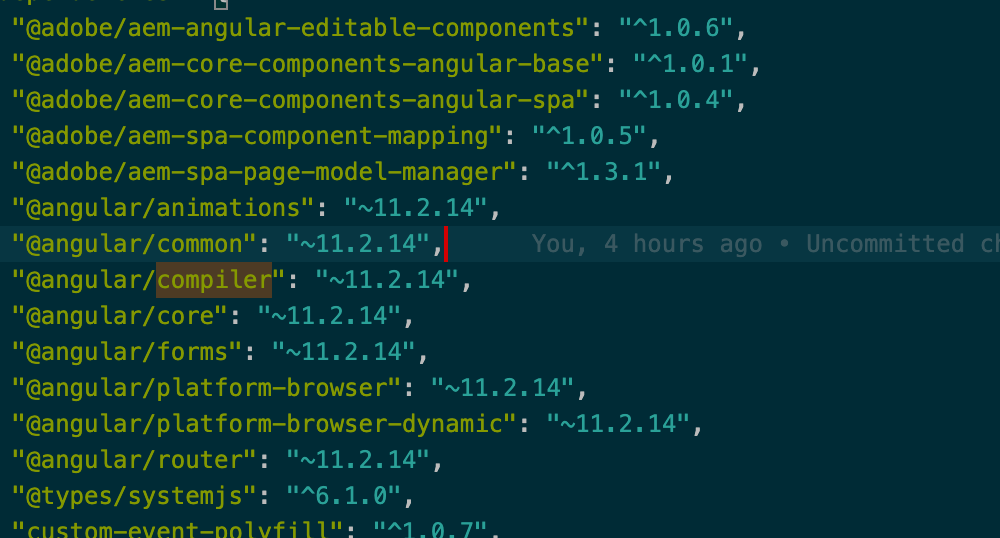
These are the AEM SPA angular npm version used for angular 11
@adobe/aem-angular-editable-components": "^1.2.1",
@adobe/aem-core-components-angular-base": "^1.0.16",
@adobe/aem-core-components-angular-spa": "^1.0.8",
@adobe/aem-spa-component-mapping": "^1.1.1",
@adobe/aem-spa-page-model-manager": "^1.3.12"
Angular version: 11.2.14
Typescript version: 4.1.3 (This is a minimum version for angular 11).
**To Reproduce**
Steps to reproduce the behavior:
1. Change the version (please refer to the screenshot )in the package.json of ui.frontend(angular project)
**Expected behavior**
The expected behaviour would be the successful build without any error
**Screenshots**
**Additional context**
Add any other context about the problem here.
Contributor guide
Research direction
Start with ui.frontend/package.json and the Angular 11 and TypeScript versions listed in the issue, then reproduce the build using the archetype 27 project structure. Review the linked build-error screenshot and compare the AEM SPA package versions involved. Done means the Angular 11 project builds successfully without the reported error.
Written by the indexing model from the issue text.
Assessment
- Tech stack
- angular, typescript
- Domain
- frontend
- Issue type
- Bug
- Difficulty
- 4/5
- Estimated time
- 3-5 days
- Activity status
- Stale
- Clarity
- Needs clarification
- Newbie friendliness
- 25/100