XcodesOrg / XcodesOrg/XcodesApp
Add overlay to Xcode app icon to indicate version
Nobody has claimed this yet.
- Dominant language
- Swift
- Stars
- 8.6k
- Forks
- 387
- Avg merge
- 6d 7h
- Merged PRs (30d)
- 3
Description
Tell us how we can improve Xcodes
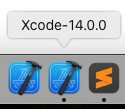
I am routinely swapping between versions of Xcode. You can obviously hover to see the version name, but being able to quickly at a glance see the version in the dock would be great.
Is your feature request related to a problem? Please describe.
It is not
What would you like to see? How would you like it to work?
I would like to see an option added that allows Xcodes to change the app icon on install with an overlay of the version. For example:
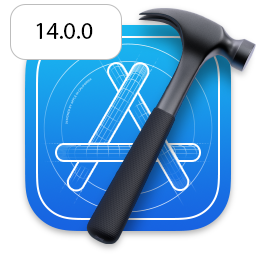
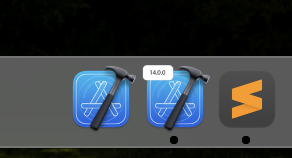
My particular example is probably a bit too small and unreadable on anything but a retina screen (should be a larger overlay that covers the icon). However, it would still be extremely helpful to see versioning at a glance
Contributor guide
First steps
- Read the whole issue, then the project's contributing guide.
- Comment on the issue to say you are picking it up — it saves two people doing the same work.
- Fork the repository and make your change on a branch.
- Open a pull request that references the issue number.
Research direction
No files, tests, or entry points are named in the issue. Start by locating the app-install and icon-generation flow, then determine how an optional version overlay can be applied; done means installed Xcode app icons can clearly show their version at a glance.
Written by the indexing model from the issue text.
Assessment
- Tech stack
- macos, swift
- Domain
- desktop
- Issue type
- Feature
- Difficulty
- 5/5
- Estimated time
- Over a week
- Activity status
- Stale
- Clarity
- Mostly clear
- Newbie friendliness
- 35/100