Change Type on data symbol does not auto populate entry
Dieses Issue hat noch niemand übernommen.
Bewertung
- Schwierigkeit
- 3/5
- Geschätzter Aufwand
- 1-2 Tage
- Anfängerfreundlichkeit
- 45/100
- Issue-Typ
- Bug
- Klarheit
- Größtenteils klar
- Aktivitätsstatus
- Veraltet
- Tech-Stack
- cpp
- Bereich
- reverse-engineering
Rechercherichtung
Reproduce the issue by opening an external symbol, selecting it, and pressing Y to open the Change Type dialog. Start at the Y action and the data-variable type dialog, then compare its behavior with function type changes; done means the selected variable's type and name populate the dialog instead of the previous history entry.
Vom Indexierungsmodell aus dem Issue-Text verfasst.
Beschreibung
Version and Platform (required):
- Binary Ninja Version: 3.0.3219-dev
- OS: macOS
- OS Version: 12.0.1
Bug Description:
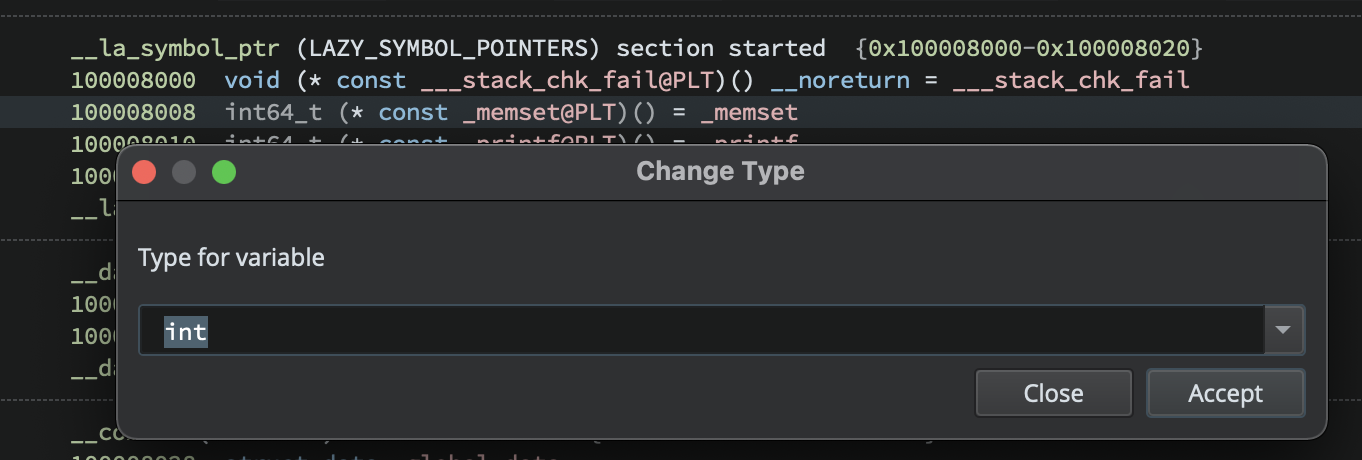
When you press Y to change the type of a function, binja automatically fills in the function's type and name. However, if you press Y to change the type of a data variable, the entry will not be filled with the variable type and uses whatever was last in your history. Additionally, the "Type for variable" text does not have the name of the variable whose type you're changing. This feels like a regression, as I'm pretty sure this used to auto fill the selected variable's type.
Steps To Reproduce:
Please provide all steps required to reproduce the behavior:
- Open any binary
- Scroll to the imports / extern section
- Click any extern symbol
- Press Y
- Observe the type dialog does not contain the type of the symbol you selected
Expected Behavior:
I expected Change Type to autofill the type of the thing whose type I am changing
Screenshots:
- Vorherrschende Sprache
- C++
- Sterne
- 1.3k
- Forks
- 298
- Ø Merge
- 5 T. 5 Std.
- Gemergte PRs (30 T.)
- 19
Beitragsleitfaden
Für dieses Repository ist kein Beitragsleitfaden indexiert
Erste Schritte
- Lesen Sie das ganze Issue und danach den Beitragsleitfaden des Projekts.
- Schreiben Sie ins Issue, dass Sie es übernehmen — das erspart doppelte Arbeit.
- Forken Sie das Repository und arbeiten Sie in einem Branch.
- Öffnen Sie einen Pull Request, der die Issue-Nummer nennt.
Mehr aus Vector35/binaryninja-api
-
Schwierigkeit 1/5 1-3 Stunden Anfängerfreundlichkeit 88/100
Vector35/binaryninja-api#8540 ·
-
Schwierigkeit 2/5 1-3 Stunden Anfängerfreundlichkeit 88/100
Vector35/binaryninja-api#8516 ·
-
Schwierigkeit 1/5 Unter einer Stunde Anfängerfreundlichkeit 92/100
Vector35/binaryninja-api#8503 ·
-
Schwierigkeit 1/5 Unter einer Stunde Anfängerfreundlichkeit 88/100
Vector35/binaryninja-api#8446 ·
-
Schwierigkeit 1/5 Unter einer Stunde Anfängerfreundlichkeit 88/100
Vector35/binaryninja-api#8444 ·
Alle Issues in Vector35/binaryninja-api
Ähnliche Issues
-
Schwierigkeit 2/5 1-3 Stunden Anfängerfreundlichkeit 86/100
-
Sensor initialization takes very long when `--initial-sim-time` is set to current UNIX timestamp Offen
Schwierigkeit 2/5 1-3 Stunden Anfängerfreundlichkeit 78/100
gazebosim/gz-sensors#662 · 1 Kommentar ·
-
enhancement
Schwierigkeit 2/5 1-3 Stunden Anfängerfreundlichkeit 76/100
-
comp-datalake
Schwierigkeit 2/5 1-3 Stunden Anfängerfreundlichkeit 88/100
ClickHouse/ClickHouse#121222 ·
-
Schwierigkeit 2/5 1-3 Stunden Anfängerfreundlichkeit 68/100
LadybirdBrowser/ladybird#12123 ·