ValveSoftware / ValveSoftware/Proton
Creatures Docking Station (1659050)
Nobody has claimed this yet.
- Dominant language
- C++
- Stars
- 32.8k
- Forks
- 1.6k
- PR merge metrics
- PR metrics pending
Description
Compatibility Report
- Name of the game with compatibility issues: Creatures Docking Station
- Steam AppID of the game: 1659050
System Information
- GPU: Intel HD Graphics 4000 (IVB GT2)
- Driver/LLVM version: Mesa 21.2.2
- Kernel version: 5.15.5-76051505-generic
- Link to full system information report as Gist: https://gist.github.com/truboxl/d89d8496d53cea55cb358acaa5c00ac2
- Proton version: Proton Experimental
I confirm:
- that I haven't found an existing compatibility report for this game.
- that I have checked whether there are updates for my system available.
Symptoms
Unable to launch the game. Getting the error:
"The game can not continue: Please change your display settings to be 'High Color (16 bit)'"
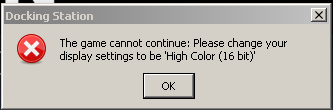
Reproduction
Simply launch the game and choose "Play Creatures Docking Station"
Notes
There simply no easy way to set 16bit color depth in Linux.
Wine suggest we have to fiddle with /etc/X11/xorg.conf.d/ or /etc/X11/xorg.conf and set something along the lines of DefaultDepth 16. But that will cause Steam not to start. See https://wiki.winehq.org/FAQ
10.4 Graphics
10.4.1 My application complains about being unable to change the resolution or color depth
You generally need to edit the Screen section of your /etc/X11/xorg.conf to support additional color depths and resolutions. There may also be a problem with Xrandr.
Another method is to use Xephyr. See https://wiki.winehq.org/256_Color_Mode
So far adding this line to Launch Options works for me:
Xephyr :2 -ac -resizeable -screen 1280x720x16 & env DISPLAY=:2 %command%
Additionally need to add these registries to steamapps/compatdata/1659050/pfx/user.reg or use protontricks
to disable window decoration and window manager control
since there is no window manager running in Xephyr.
Running mutter or another WM in Xephyr seems to mess things up for me.
[Software\\Wine\\X11 Driver] 1639931810
#time=1d7f4f69fbce18e
"Decorated"="N"
"Managed"="N"
Going full screen and then back to windowed screen seems to break the game however. Audio still running though. Alt+Enter sometimes fixes the problem.
Contributor guide
No contributing guide indexed for this repository
First steps
- Read the whole issue, then the project's contributing guide.
- Comment on the issue to say you are picking it up — it saves two people doing the same work.
- Fork the repository and make your change on a branch.
- Open a pull request that references the issue number.
Research direction
Start by reproducing the failure by launching Creatures Docking Station with Proton Experimental and review the reported display-depth error. The report names no source file, test, or requested implementation change; completion would require a confirmed compatibility fix and a clear way to verify the game launches.
Written by the indexing model from the issue text.
Assessment
- Tech stack
- linux
- Domain
- operating-systems
- Issue type
- Bug
- Difficulty
- 5/5
- Estimated time
- Over a week
- Activity status
- Stale
- Clarity
- Needs clarification
- Newbie friendliness
- 25/100