ValveSoftware / ValveSoftware/Proton
Atelier Ryza 2: Lost Legends & the Secret Fairy (1257290)
Nobody has claimed this yet.
- Dominant language
- C++
- Stars
- 32.8k
- Forks
- 1.6k
- PR merge metrics
- PR metrics pending
Description
Compatibility Report
- Name of the game with compatibility issues: Atelier Ryza 2: Lost Legends & the Secret Fairy
- Steam AppID of the game: 1257290
System Information
- GPU: rx 5700 xt sapphire pulse
- Driver/LLVM version: Mesa 21.0.0-rc2
- Kernel version: 5.10.10
- Link to full system information report as Gist: system info
- Proton: 1611589137 experimental-5.13-20210125
- SteamLinuxRuntime: v0.20210114.1-0-g5a1cbb7
- pressure-vessel: 0.20210114.0+srt1 scout 0.20210114.2
- soldier: 0.20210114.2 soldier 0.20210114.2
- Desktop: Gnome 3.38.2 on Wayland
I confirm:
- that I haven't found an existing compatibility report for this game.
- that I have checked whether there are updates for my system available.
Proton log:
The issue is so unusual to me that is hard to describe. By default this game starts in window mode. I noticed that the animation in the start menu was at 40 fps but felt a lot slower slower than that. But I was able to start the game. And the first impression was good. Solid 60 fps and no issue until Ryza got to the capital after the first battle. From this point on the game became unplayable. What is weird is that the framerate feels like 5 fps although Steam fps counter shows no less than 40 fps. Depending on where the camera is pointing it counts 60 fps. I don't know if heavy stuttering is the right word here. I am not a native English speaker. But it is almost like many frames are missing between one movement and the other.
Alt-tab is broken. The game window just stays over everything even if changing virtual desktops. But as strange as it may sound we can do alt-tab while the game shows the usual loading screen propaganda. It is only after getting to its start menu that things get weird. Like this image shows:
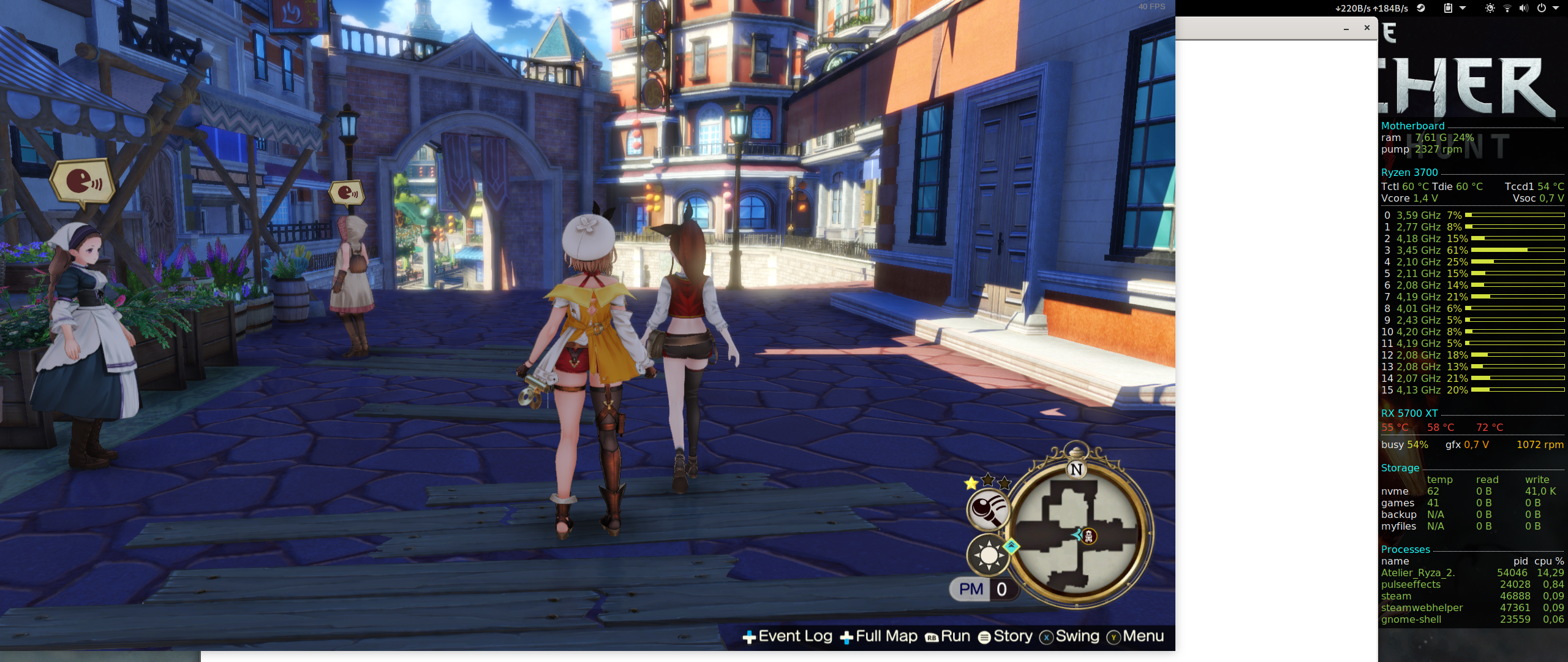
The game window is detached from another that stays in the background.
I tried Proton 5.13-5 but there was no difference. I also tried switching between amdvlk and radv but nothing changed. Another attempt was using Xorg instead of Wayland. But things get worse. Instead of a slow start menu there is a white screen.
Contributor guide
No contributing guide indexed for this repository
First steps
- Read the whole issue, then the project's contributing guide.
- Comment on the issue to say you are picking it up — it saves two people doing the same work.
- Fork the repository and make your change on a branch.
- Open a pull request that references the issue number.
Research direction
No source file or test is named. Start by reviewing the attached Proton log for Steam AppID 1257290 and comparing the reported behavior across Wayland/Xorg, RADV/AMDVLK, and Proton versions; done means identifying the compatibility cause and confirming normal rendering and window switching.
Written by the indexing model from the issue text.
Assessment
- Tech stack
- linux
- Domain
- operating-systems
- Issue type
- Bug
- Difficulty
- 4/5
- Estimated time
- 3-5 days
- Activity status
- Stale
- Clarity
- Needs clarification
- Newbie friendliness
- 25/100