ValveSoftware / ValveSoftware/Proton
EarthWorm Jim 3D (41600)
Nobody has claimed this yet.
- Dominant language
- C++
- Stars
- 32.8k
- Forks
- 1.6k
- PR merge metrics
- PR metrics pending
Description
Compatibility Report
- Name of the game with compatibility issues: EarthWorm Jim 3D
- Steam AppID of the game: 41600
System Information
- GPU: GTX 1060
- Driver/LLVM version: nvidia 440.82
- Kernel version: 5.7.0
- OS: Mangaro XFCE
- Proton version: 5.0-9
I confirm:
- that I haven't found an existing compatibility report for this game.
- that I have checked whether there are updates for my system available.
Symptoms
The game seems to run fine, even my controller work properly (Logitech F710), except there is one problem preventing from playing: it doesn't display letters or numbers.
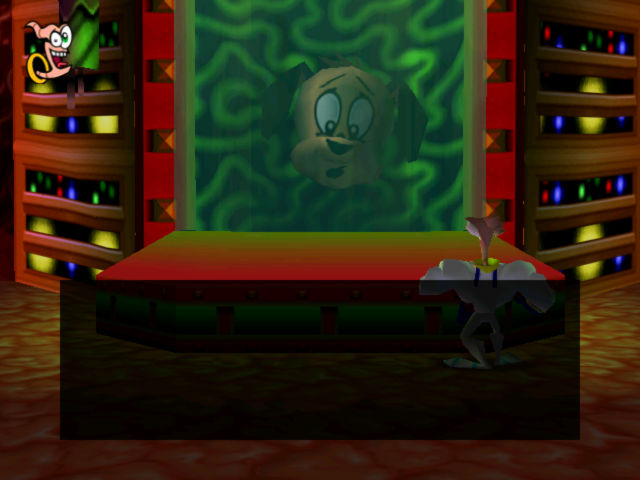
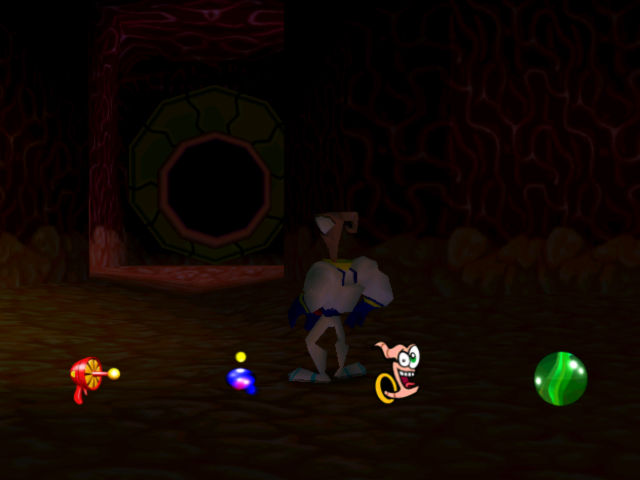
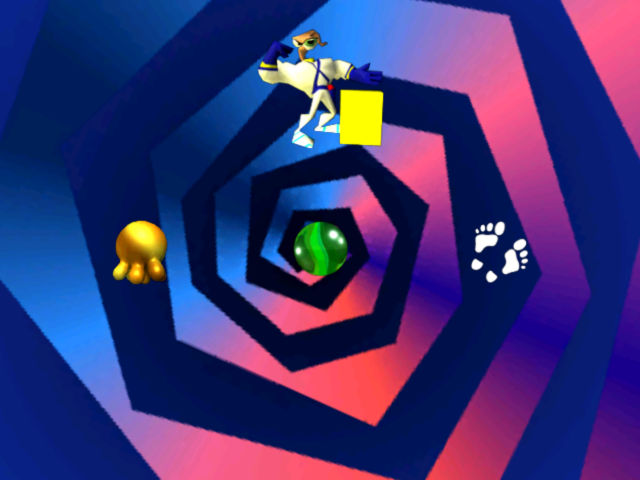
There is Funhouse.ttf font in the game's folder, I've installed it on my system, even copied it into steamapps/compatdata/41600/pfx/drive_c/windows/Fonts/, no use. Is there a way to fix that?
Reproduction
Just launch the game and get to the main menu. It will look like this:

Contributor guide
No contributing guide indexed for this repository
First steps
- Read the whole issue, then the project's contributing guide.
- Comment on the issue to say you are picking it up — it saves two people doing the same work.
- Fork the repository and make your change on a branch.
- Open a pull request that references the issue number.
Research direction
Start by reviewing the attached steam-41600.zip Proton log and the reported system details, then reproduce the issue by launching EarthWorm Jim 3D and reaching the main menu. Done means the game's letters and numbers render correctly while running with the reported Proton setup.
Written by the indexing model from the issue text.
Assessment
- Tech stack
- linux
- Domain
- operating-systems
- Issue type
- Bug
- Difficulty
- 4/5
- Estimated time
- 3-5 days
- Activity status
- Quiet
- Clarity
- Mostly clear
- Newbie friendliness
- 45/100