ValveSoftware / ValveSoftware/Proton
SD Gundam G Generation Cross Rays (728530)
Nobody has claimed this yet.
- Dominant language
- C++
- Stars
- 32.8k
- Forks
- 1.6k
- PR merge metrics
- PR metrics pending
Description
Compatibility Report
- Name of the game with compatibility issues: SD Gundam G Generation Cross Rays
- Steam AppID of the game: 728530
System Information
- GPU: EVGA GeForce RTX 2080 Ti FTW3 ULTRA GAMING
- Driver/LLVM version: nvidia 440.44-1
- Kernel version: 5.4.6-2-MANJARO
- Link to full system information report as Gist: N/A, but can be provided if needed
- Proton version: 4.11-11
I confirm:
- that I haven't found an existing compatibility report for this game.
- that I have checked whether there are updates for my system available.
Symptoms
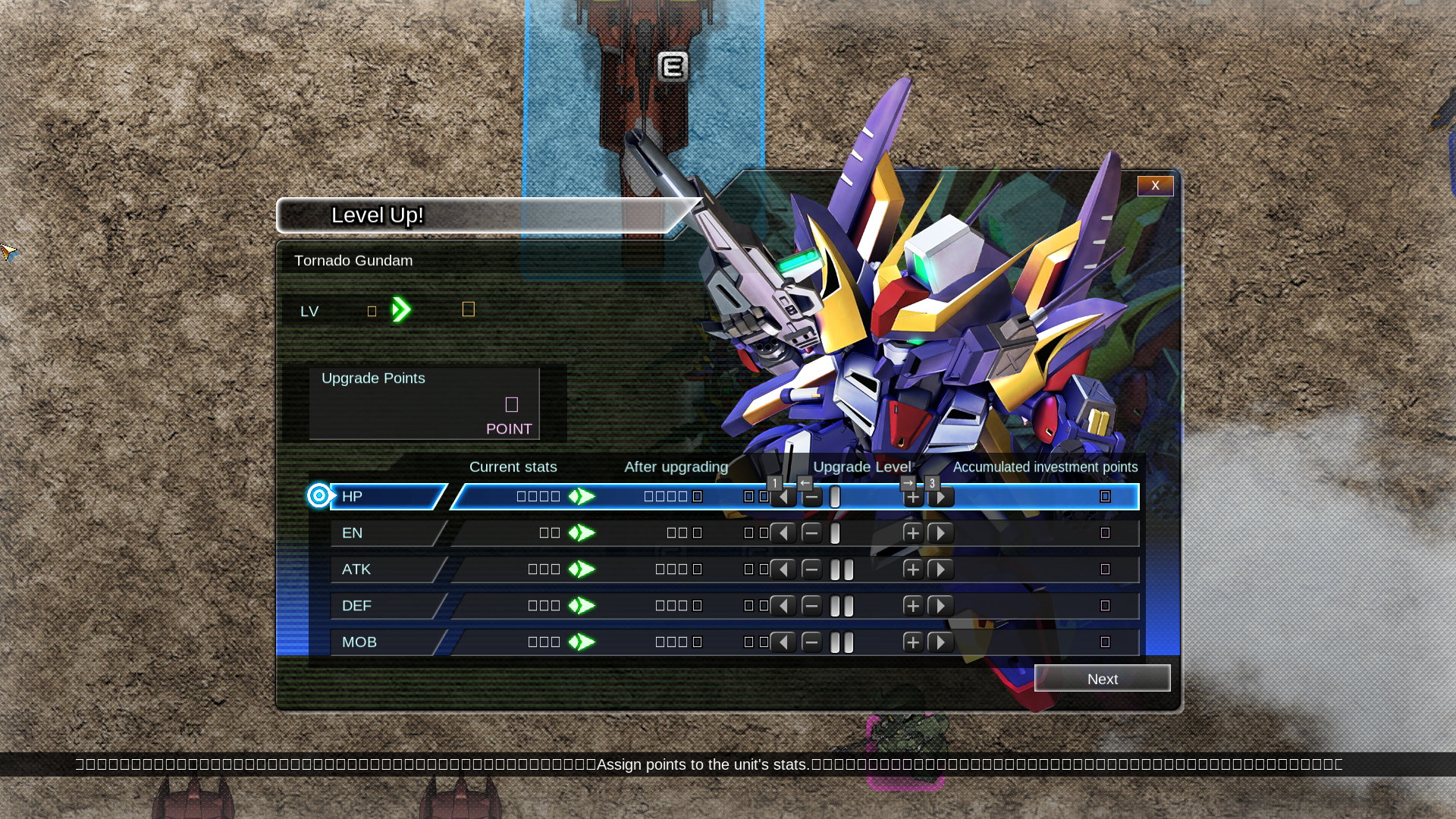
Game shows □ on a number of menus, UI's. In the screenshot below during a battle sequence you can see not only the upgrade window has □ all over, but the footer does as well. This makes it impossible to see how many credits a unit costs to produce, etc.
Presumably this is due to missing ideograph support with whatever Unicode support Proton/Wine comes with. It would seems it primarily concerns numbers and special characters based on inference of where it crops up
Reproduction
Launch the game and toggle through the menus like the menu to produce units. You should very quickly come across □ characters. Alternatively, you can go into a Story mission at which point during unit control you can see a footer bar with them as well as them near the string showing selected weapon.
Contributor guide
No contributing guide indexed for this repository
First steps
- Read the whole issue, then the project's contributing guide.
- Comment on the issue to say you are picking it up — it saves two people doing the same work.
- Fork the repository and make your change on a branch.
- Open a pull request that references the issue number.
Research direction
Start by reproducing SD Gundam G Generation Cross Rays under Proton 4.11-11 and review the reported menu and battle UI symptoms. Investigate the missing ideograph or glyph behavior using the provided system details and reproduction steps; done means the square characters no longer replace the affected numbers and special characters.
Written by the indexing model from the issue text.
Assessment
- Tech stack
- linux
- Domain
- operating-systems
- Issue type
- Bug
- Difficulty
- 4/5
- Estimated time
- 3-5 days
- Activity status
- Stale
- Clarity
- Needs clarification
- Newbie friendliness
- 35/100