ValveSoftware / ValveSoftware/Proton
Slab (844180)
Nobody has claimed this yet.
- Dominant language
- C++
- Stars
- 32.8k
- Forks
- 1.6k
- PR merge metrics
- PR metrics pending
Description
Compatibility Report
- Name of the game with compatibility issues: Slab
- Steam AppID of the game: 844180
System Information
- GPU: Radeon RX 470 4GB
- Driver/LLVM version: 4.5 (Compatibility Profile) Mesa 18.3.0-devel - padoka PPA, DRM 3.23.0, LLVM 8.0.0
- Kernel version: 4.15.0-34-generic
- Link to full system information report: https://gist.github.com/veikk0/d0ebb1ddda8f9582d1799df343bfefe5
- Proton version: 3.7-6
I confirm:
- that I haven't found an existing compatibility report for this game.
- that I have checked whether there are updates for my system available.
Symptoms
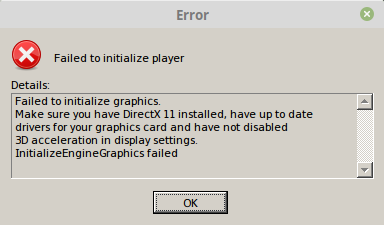
Unless the game is launched with PROTON_USE_WINED3D11=1, it crashes at startup with the following "Failed to initialize graphics" error:
Log: steam-844180.log
When launched with the WineD3D env var the game seems to function normally for the most part. The game exhibits a noticable amount of mouse input lag, however, it doesn't make the game unplayable.
After changing the resolution from 720p to 1080p and then back again to see if that would affect the input lag, I found the resolution selection dropdown menu to be unresponsive and require clicking around multiple times for it to open the menu and also to select the desired resolution.
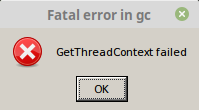
I played 4 levels and the game crashed, displaying the following error:
Log of the play session that crashed: steam-844180.log
I also ran the game with PROTON_NO_ESYNC=1 but this didn't reduce the input lag. I didn't play long enough to see whether the game would crash again, so it's difficult to say whether this affected stability.
In a quick test I observed this same behavior on a older laptop with integrated Intel graphics, with the exception of the in-game crash. Laptop specs: https://gist.github.com/veikk0/cb39ea5b6ec13e073ff5897aa53d1ffe
Reproduction
Play the game with and without PROTON_USE_WINED3D11=1.
Contributor guide
No contributing guide indexed for this repository
First steps
- Read the whole issue, then the project's contributing guide.
- Comment on the issue to say you are picking it up — it saves two people doing the same work.
- Fork the repository and make your change on a branch.
- Open a pull request that references the issue number.
Research direction
Start by reviewing the linked steam-844180.log files and comparing reproduction with and without PROTON_USE_WINED3D11=1; the report also notes PROTON_NO_ESYNC=1 as a variable to test. Done would require identifying and resolving the startup or in-game crash behavior without relying on the WineD3D workaround, with the reported game scenarios reproduced successfully.
Written by the indexing model from the issue text.
Assessment
- Tech stack
- linux
- Domain
- operating-systems
- Issue type
- Bug
- Difficulty
- 5/5
- Estimated time
- Over a week
- Activity status
- Stale
- Clarity
- Needs clarification
- Newbie friendliness
- 25/100