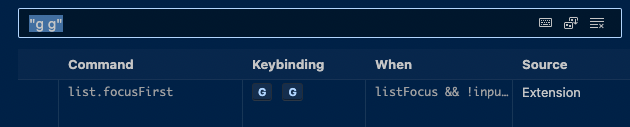
Extension binding g g gives error: The key combination (G, G) is not a command
Nobody has claimed this yet.
- Dominant language
- TypeScript
- Stars
- 15.2k
- Forks
- 1.5k
- Avg merge
- 3d 18h
- Merged PRs (30d)
- 6
Description
Describe the bug
Tried using this extension with .js and .jsx files (no other 3rd party extensions installed other than yours), and the keyboard shortcut g g (which I expect to take me to the top of the page, opposite of G), gives me the error at the bottom of the VSCode editor as described in title.
To Reproduce
- Install VSCode Extension Vim
- Open a
.jsxor.jsfile. - try to us
g gto get to the top of the page
Expected behavior
The command list.focusFirst should invoke properly as is indicated by the g g biding and I subsequently expect to have my cursor moved to the top of the page.
Screenshots

Environment (please complete the following information):
macOS Monterey
VSCode 1.74.3 (Universal)
Additional context
Again, this only seems to affect .jsx and .js files for some reason. Any other file will behavior properly.
The when clause for the keybinding is: listFocus && !inputFocus
Contributor guide
First steps
- Read the whole issue, then the project's contributing guide.
- Comment on the issue to say you are picking it up — it saves two people doing the same work.
- Fork the repository and make your change on a branch.
- Open a pull request that references the issue number.
Research direction
Reproduce the issue in VSCode 1.74.3 with a .js or .jsx file and the Vim extension, then inspect the g g keybinding and its listFocus && !inputFocus condition. Done means g g invokes list.focusFirst and moves the cursor to the top without reporting that (G, G) is not a command.
Written by the indexing model from the issue text.
Assessment
- Tech stack
- typescript, vscode
- Domain
- developer-experience, tooling
- Issue type
- Bug
- Difficulty
- 3/5
- Estimated time
- 1-2 days
- Activity status
- Stale
- Clarity
- Mostly clear
- Newbie friendliness
- 45/100