INSERT mode and NORMAL mode are active at the same time.
Open
Nobody has claimed this yet.
area/non-latin-characters
kind/bug
- Dominant language
- TypeScript
- Stars
- 15.2k
- Forks
- 1.5k
- Avg merge
- 3d 18h
- Merged PRs (30d)
- 6
Description
Describe the bug
A clear and concise description of what the bug is.
To Reproduce
- open a text file
- text anything
- switch input method to Chinese
- hit ESC
Expected behavior
NORMOL mode and INSERT mode shouldn't active at the same time
Screenshots
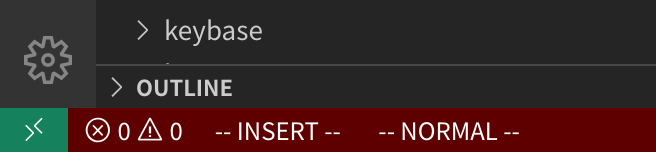
Environment (please complete the following information):
my config
{
    "editor.wordSeparators": "/\\()\"':,.;<>~!@#$%^&*|+=[]{}`?-",
    "rust-client.engine": "rust-analyzer",
    "rust-client.rustupPath": "~/.cargo/bin/rustup",
    "rust.all_features": true,
    "rust.rust-analyzer.path": "",
    "vim.neovimPath": "",
    "vim.showMarksInGutter": true,
    "workbench.editor.restoreViewState": false,
    "window.restoreWindows": "none",
    "vim.autoSwitchInputMethod.enable": true,
    "vim.autoSwitchInputMethod.obtainIMCmd": "/usr/bin/fcitx5-remote",
    "vim.autoSwitchInputMethod.switchIMCmd": "/usr/bin/fcitx5-remote {im}",
    "files.autoSave": "afterDelay",
    "editor.cursorSmoothCaretAnimation": true,
    "go.toolsManagement.autoUpdate": true,
    "vim.autoSwitchInputMethod.defaultIM": "1",
    "http.proxy": "http://127.0.0.1:1081",
    "vim.smartRelativeLine": true,
    "vim.easymotion": true,
    "vim.sneak": true,
    "vim.sneakUseIgnorecaseAndSmartcase": true,
    "vim.statusBarColorControl": true,
    "vim.visualstar": true,
    "workbench.colorCustomizations": {
        "statusBar.background": "#5f0000",
        "statusBar.noFolderBackground": "#5f0000",
        "statusBar.debuggingBackground": "#5f0000"
    },
    "vim.commandLineModeKeyBindingsNonRecursive": [

    ]
}
- Extension (VsCodeVim) version:v1.21.8
- VSCode version:1.60.2
7f6ab5485bbc008386c4386d08766667e155244e
x64 - OS: Archlinux 5.10.69-1-lts
Contributor guide
First steps
- Read the whole issue, then the project's contributing guide.
- Comment on the issue to say you are picking it up — it saves two people doing the same work.
- Fork the repository and make your change on a branch.
- Open a pull request that references the issue number.
Research direction
Reproduce the issue in VSCodeVim 1.21.8 using the listed steps, especially with vim.autoSwitchInputMethod enabled and the fcitx5 commands configured. Trace the input-method switching behavior after pressing ESC; done means NORMAL and INSERT modes are not shown as active at the same time.
Written by the indexing model from the issue text.
Assessment
- Tech stack
- typescript, vscode
- Domain
- tooling
- Issue type
- Bug
- Difficulty
- 3/5
- Estimated time
- 1-2 days
- Activity status
- Stale
- Clarity
- Mostly clear
- Newbie friendliness
- 35/100