Can not edit inserted snippet correctly with vscode surround extension
Nobody has claimed this yet.
- Dominant language
- TypeScript
- Stars
- 15.2k
- Forks
- 1.5k
- Avg merge
- 3d 18h
- Merged PRs (30d)
- 6
Description
Describe the bug
Can not edit inserted snippet with vscode surround extension

To Reproduce
Steps to reproduce the behavior:
- press
shift+vto select a line - invoke
surround.with (ctrl+shift+T)command - choose
surround.with.forioption - press
cor enter something to edit hightlight text at snippet template - cut the current line (wrong behavior)
Other inserted snippet has weird behavior too.
Expected behavior
Should edit hightlight text at snippet template correctly.
Screenshots
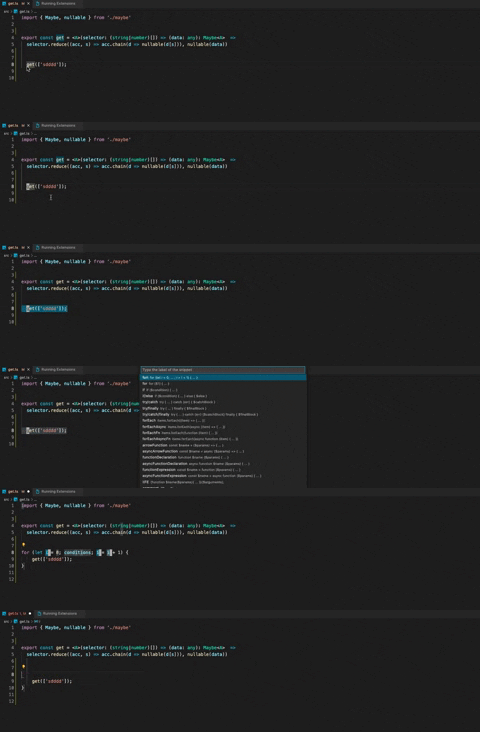
Environment (please complete the following information):
- Extension (VsCodeVim) version: 1.21.3
- VSCode version: 1.57.1
- OS: MacBook Pro (13-inch, 2016, Four Thunderbolt 3 Ports)
Additional context
Contributor guide
First steps
- Read the whole issue, then the project's contributing guide.
- Comment on the issue to say you are picking it up — it saves two people doing the same work.
- Fork the repository and make your change on a branch.
- Open a pull request that references the issue number.
Research direction
Reproduce the interaction using the listed VSCodeVim and VSCode versions, following the five steps with the vscode-surround extension. Inspect the linked surround.ts source and the VSCodeVim integration involved in snippet editing. Done means inserted snippets can be edited without cutting the current line or showing the reported behavior.
Written by the indexing model from the issue text.
Assessment
- Tech stack
- typescript
- Domain
- devtools
- Issue type
- Bug
- Difficulty
- 3/5
- Estimated time
- 1-2 days
- Activity status
- Stale
- Clarity
- Mostly clear
- Newbie friendliness
- 38/100