`<D-d>` in insert mode leaves input mode and starts emulated multi-cursor mode
Nobody has claimed this yet.
- Dominant language
- TypeScript
- Stars
- 15.2k
- Forks
- 1.5k
- Avg merge
- 3d 18h
- Merged PRs (30d)
- 6
Description
Describe the bug
When in insert mode, cmd+d leaves insert mode and enters this extension's special multi-cursor mode that is different from the native multi-cursor mode.
To Reproduce
Steps to reproduce the behavior:
Given a document
|Word
Word
Word
Start insert mode i, and press cmd+d.
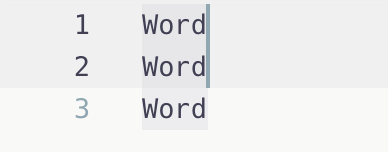
Word|
Word|
Word
Press esc.
Word|
Word|
Word
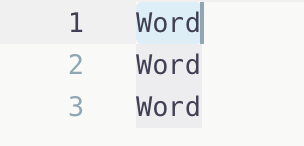
Expected behavior
|Word|
Word
Word
One word selected, no mode changes (still in native/insert mode).
Screenshots
If applicable, add screenshots to help explain your problem.
If remapping-related, please attach log output: https://github.com/VSCodeVim/Vim#debugging-remappings.
Actual
Expected
Environment (please complete the following information):
- Extension (VsCodeVim) version: 1.18.9
- VSCode version: 1.53.2
- OS: macOS 11.2.1
Contributor guide
First steps
- Read the whole issue, then the project's contributing guide.
- Comment on the issue to say you are picking it up — it saves two people doing the same work.
- Fork the repository and make your change on a branch.
- Open a pull request that references the issue number.
Research direction
Start by reproducing the reported Cmd+D behavior in VSCode 1.53.2 on macOS while in insert mode, using the documented sequence: press i, Cmd+D, then Esc. Trace the extension's insert-mode key handling and multi-cursor mapping; done means Cmd+D selects one word without leaving insert mode or entering the extension's special multi-cursor mode.
Written by the indexing model from the issue text.
Assessment
- Tech stack
- typescript
- Domain
- tooling
- Issue type
- Bug
- Difficulty
- 3/5
- Estimated time
- 1-2 days
- Activity status
- Stale
- Clarity
- Mostly clear
- Newbie friendliness
- 45/100