[bug] Using vscode shortcuts to switch between compressedFolders caused problems `Cannot read property 'previous' of undefined`
Nobody has claimed this yet.
- Dominant language
- TypeScript
- Stars
- 15.2k
- Forks
- 1.5k
- Avg merge
- 3d 18h
- Merged PRs (30d)
- 6
Description
How to reproduce the bug
-
I use these shortcuts to switch left or right in compressedFolders:
{ "key": "shift+h", "command": "previousCompressedFolder", "when": "explorerViewletCompressedFocus && explorerViewletVisible && filesExplorerFocus && !explorerViewletCompressedFirstFocus && !inputFocus" }, { "key": "shift+l", "command": "nextCompressedFolder", "when": "explorerViewletCompressedFocus && explorerViewletVisible && filesExplorerFocus && !explorerViewletCompressedLastFocus && !inputFocus" }, { "key": "g h", "command": "firstCompressedFolder", "when": "explorerViewletCompressedFocus && explorerViewletVisible && filesExplorerFocus && !explorerViewletCompressedFirstFocus && !inputFocus" }, { "key": "g l", "command": "lastCompressedFolder", "when": "explorerViewletCompressedFocus && explorerViewletVisible && filesExplorerFocus && !explorerViewletCompressedLastFocus && !inputFocus" }, -
Here is the workspace structure which the bug occurred:
.
└── test
    └── test1
        ├── test2
        └── test3
            └── README.md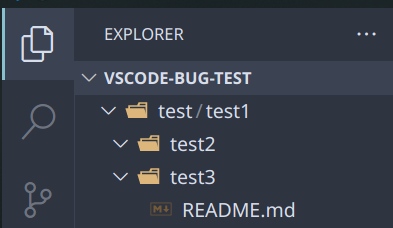
-
Make sure the folders are expand. Don't fold them
-
All you need to do is
ctrl + shift + pto execute commandworkbench.action.reloadWindow. After reloading, try to use shortcuts above to switch between foldertestandtest1, then the bug noticeCannot read property 'previous' of undefinedorCannot read property 'next' of undefinedwill be shown in the rightdown corner: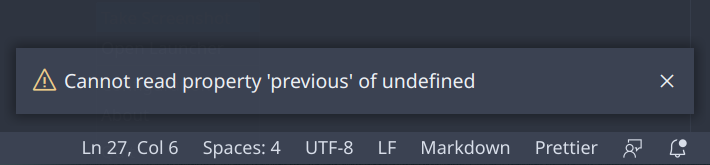
Some information may be useful
OS:
    Manjaro KDE Edition
VSCode Version:
    1.53.2
Vim Version:
    1.18.9
Contributor guide
First steps
- Read the whole issue, then the project's contributing guide.
- Comment on the issue to say you are picking it up — it saves two people doing the same work.
- Fork the repository and make your change on a branch.
- Open a pull request that references the issue number.
Research direction
Reproduce the issue in the shown test/test1/test2/test3/README.md workspace with the listed previousCompressedFolder, nextCompressedFolder, firstCompressedFolder, and lastCompressedFolder shortcuts after running workbench.action.reloadWindow. Trace those command entry points and verify that switching between expanded compressed folders no longer reports an undefined previous or next property.
Written by the indexing model from the issue text.
Assessment
- Tech stack
- typescript, vscode
- Domain
- devtools
- Issue type
- Bug
- Difficulty
- 3/5
- Estimated time
- 1-2 days
- Activity status
- Stale
- Clarity
- Mostly clear
- Newbie friendliness
- 45/100