Korean character input wrong way.
Nobody has claimed this yet.
- Dominant language
- TypeScript
- Stars
- 15.2k
- Forks
- 1.5k
- Avg merge
- 3d 18h
- Merged PRs (30d)
- 6
Description
Describe the bug
A clear and concise description of what the bug is.
To Reproduce
Steps to reproduce the behavior:
- enable vim plugin
- Typing "가나다"
Expected behavior
A clear and concise description of what you expected to happen.
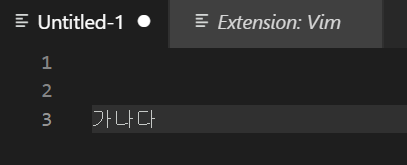
Screenshots
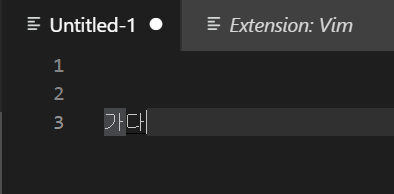
Environment (please complete the following information):
- Extension (VsCodeVim) version: v1.18.5
- VSCode version: 1.52.1
- OS: Windows 10 x64 10.0.18363
Additional context
Add any other context about the problem here.
Contributor guide
First steps
- Read the whole issue, then the project's contributing guide.
- Comment on the issue to say you are picking it up — it saves two people doing the same work.
- Fork the repository and make your change on a branch.
- Open a pull request that references the issue number.
Research direction
Start by reproducing the issue with the Vim plugin enabled and typing "가나다" in VSCode on Windows 10, using the reported VSCodeVim and VSCode versions. Compare the actual input with the screenshots and determine the expected Korean character behavior; done means the input matches that expectation and the regression is covered by an appropriate test.
Written by the indexing model from the issue text.
Assessment
- Tech stack
- typescript, vscode
- Domain
- devtools
- Issue type
- Bug
- Difficulty
- 3/5
- Estimated time
- 1-2 days
- Activity status
- Stale
- Clarity
- Needs clarification
- Newbie friendliness
- 25/100