Using `~` to refer to home dir does not work, path is interpreted relative to CWD.
Nobody has claimed this yet.
- Dominant language
- TypeScript
- Stars
- 15.2k
- Forks
- 1.5k
- Avg merge
- 3d 18h
- Merged PRs (30d)
- 6
Description
Describe the bug
Using ~ to refer to home dir does not work, instead, the path is interpreted relative to CWD.
I tried to open my .vimrc file in NORMAL mode by typing :tabe ~/.vimrc, the extension tried to open CWD/~/.vimrc instead of ~/.vimrc.
To Reproduce
Steps to reproduce the behavior:
- Be in normal mode
- Type
:tabe ~/.vimrc
Expected behavior
.vimrc file in the home dir of the current user should open.
Screenshots
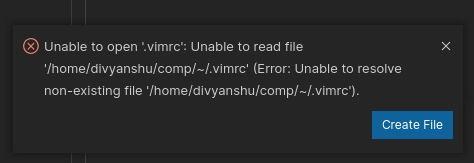
Environment (please complete the following information):
I'm using neo-vim mode.
Extension (VsCodeVim) version: v1.18.5
VSCode Version: 1.52.1
Commit: ea3859d4ba2f3e577a159bc91e3074c5d85c0523
Date: 2020-12-16T16:32:10.090Z
Electron: 9.3.5
Chrome: 83.0.4103.122
Node.js: 12.14.1
V8: 8.3.110.13-electron.0
OS: Linux x64 5.4.0-54-generic snap
Additional context
N/A
Contributor guide
First steps
- Read the whole issue, then the project's contributing guide.
- Comment on the issue to say you are picking it up — it saves two people doing the same work.
- Fork the repository and make your change on a branch.
- Open a pull request that references the issue number.
Research direction
Start by reproducing :tabe ~/.vimrc in NORMAL mode with neo-vim mode enabled, using the environment details in the report as a reference. Trace the path handling for this command and verify that the home-directory file opens instead of being resolved relative to CWD.
Written by the indexing model from the issue text.
Assessment
- Tech stack
- neovim, typescript, vscode
- Domain
- developer-experience, tooling
- Issue type
- Bug
- Difficulty
- 3/5
- Estimated time
- 1-2 days
- Activity status
- Stale
- Clarity
- Clearly specified
- Newbie friendliness
- 35/100