Pane movement remappings saved in the .vimrc file aren't translated over
Nobody has claimed this yet.
- Dominant language
- TypeScript
- Stars
- 15.2k
- Forks
- 1.5k
- Avg merge
- 3d 18h
- Merged PRs (30d)
- 6
Description
Describe the bug
My .vimrc file contains the following remappings:
nnoremap <C-J> <C-W><C-J>
nnoremap <C-K> <C-W><C-K>
nnoremap <C-L> <C-W><C-L>
nnoremap <C-H> <C-W><C-H>
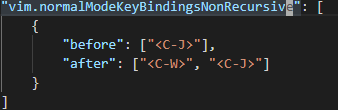
The vscodevim extension does not pick these up (those using the "vim.normalModeKeyBindingsNonRecursive" method to remap these keys doesn't seem to work either.
To Reproduce
Steps to reproduce the behavior:
- Create a .vimrc file with the above-mentioned remaps.
- Set vscodevim up to read this .vimrc file
- Create a split using
:vsp - Use the standard VIM commands to move between panes and note that it works as expected.
- Use the remapped commands above to move between panes and note that nothing happens.
Expected behavior
The above-mentioned remappings should function as expected.
Screenshots
Here is my attempt to get this working "manually", though it is also failing:
Environment (please complete the following information):
Extension version: 1.13.1
VS Code version: Code 1.44.2 (ff915844119ce9485abfe8aa9076ec76b5300ddd, 2020-04-16T16:36:23.138Z)
OS version: Windows_NT x64 10.0.18363
System Info
| Item | Value |
|---|---|
| CPUs | Intel(R) Xeon(R) Silver 4114 CPU @ 2.20GHz (4 x 2195) |
| GPU Status | 2d_canvas: enabled flash_3d: enabled flash_stage3d: enabled flash_stage3d_baseline: enabled gpu_compositing: enabled multiple_raster_threads: enabled_on oop_rasterization: unavailable_off protected_video_decode: unavailable_off rasterization: unavailable_off skia_renderer: disabled_off_ok video_decode: enabled viz_display_compositor: enabled_on viz_hit_test_surface_layer: disabled_off_ok webgl: enabled webgl2: enabled |
| Load (avg) | undefined |
| Memory (System) | 16.00GB (7.43GB free) |
| Process Argv | --folder-uri file:///e%3A/dev/code/components |
| Screen Reader | no |
| VM | 100% |
Contributor guide
First steps
- Read the whole issue, then the project's contributing guide.
- Comment on the issue to say you are picking it up — it saves two people doing the same work.
- Fork the repository and make your change on a branch.
- Open a pull request that references the issue number.
Research direction
Start by tracing how the .vimrc remappings and the vim.normalModeKeyBindingsNonRecursive setting are loaded, using the reported :vsp and pane-movement steps to reproduce the failure. Done means the listed Ctrl-J, Ctrl-K, Ctrl-L, and Ctrl-H mappings move between splits as expected.
Written by the indexing model from the issue text.
Assessment
- Tech stack
- typescript, vscode
- Domain
- tooling
- Issue type
- Bug
- Difficulty
- 3/5
- Estimated time
- 1-2 days
- Activity status
- Stale
- Clarity
- Mostly clear
- Newbie friendliness
- 35/100