Disable Input Method sometimes doesn't work
Open
Nobody has claimed this yet.
- Dominant language
- TypeScript
- Stars
- 15.2k
- Forks
- 1.5k
- Avg merge
- 3d 18h
- Merged PRs (30d)
- 6
Description
Input method invalidation using vim.autoSwitchInputMethod is not invalidated about once in 10 times.
- Go to insert mode (i)
- Change to full-width input mode
- Go to normal mode (ctrl + c)
- IME display in alphanumeric mode but full-width mode
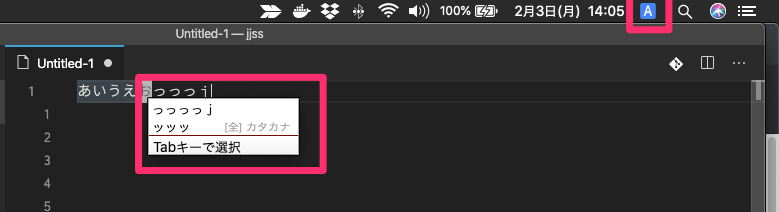
settings
"vim.autoSwitchInputMethod.enable": true,
"vim.autoSwitchInputMethod.defaultIM": "com.google.inputmethod.Japanese.Roman",
"vim.autoSwitchInputMethod.obtainIMCmd": "/usr/local/bin/im-select com.google.inputmethod.Japanese.Roman",
"vim.autoSwitchInputMethod.switchIMCmd": "/usr/local/bin/im-select {im}",
Extension (VsCodeVim) version:1.12.4
VSCode version:1.41.1
OS:macOS Catalina 10.15.2
Contributor guide
First steps
- Read the whole issue, then the project's contributing guide.
- Comment on the issue to say you are picking it up — it saves two people doing the same work.
- Fork the repository and make your change on a branch.
- Open a pull request that references the issue number.
Research direction
Reproduce the failure using the listed vim.autoSwitchInputMethod settings and the insert-to-normal-mode steps on macOS Catalina. Trace the extension entry points that invoke obtainIMCmd and switchIMCmd, then verify that leaving insert mode consistently restores the configured default IME.
Written by the indexing model from the issue text.
Assessment
- Tech stack
- macos, typescript
- Domain
- desktop, tooling
- Issue type
- Bug
- Difficulty
- 4/5
- Estimated time
- 3-5 days
- Activity status
- Stale
- Clarity
- Mostly clear
- Newbie friendliness
- 35/100