Pressing `:` appears to be broken in both Normal and Insert modes
Open
Nobody has claimed this yet.
kind/bug
- Dominant language
- TypeScript
- Stars
- 15.2k
- Forks
- 1.5k
- Avg merge
- 3d 18h
- Merged PRs (30d)
- 6
Description
Describe the bug
Pressing : doesn't work, regardless of mode.
To Reproduce
Steps to reproduce the behavior:
- Open a file. Enter Normal mode, type
Shift + : + w - See the following error:

- Enter Insert mode. Type
:in the editor. - See the following prompt in the status bar, and note that a colon is not inserted into the editor.

Expected behavior
When in Normal mode, pressing shift + : + w should execute the write command.
When in Insert mode, pressing : should enter a colon into the editor.
Screenshots
(See above)
Environment (please complete the following information):
- Extension (VsCodeVim) version: 1.11.3
- VSCode version: 1.39.2
- OS: Darwin x64 19.0.0
Additional context
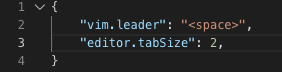
This is the entirety of my settings.json:
Contributor guide
First steps
- Read the whole issue, then the project's contributing guide.
- Comment on the issue to say you are picking it up — it saves two people doing the same work.
- Fork the repository and make your change on a branch.
- Open a pull request that references the issue number.
Research direction
No source files, tests, or entry points are mentioned. Reproduce the colon behavior in VSCode using the reported Normal and Insert mode steps, then trace the key handling paths; done means :w works in Normal mode and : is inserted in Insert mode.
Written by the indexing model from the issue text.
Assessment
- Tech stack
- typescript, vscode
- Domain
- developer-experience, tooling
- Issue type
- Bug
- Difficulty
- 3/5
- Estimated time
- 1-2 days
- Activity status
- Stale
- Clarity
- Mostly clear
- Newbie friendliness
- 30/100