Pasting default register in insert mode with dead keys on OSX replaces last char with double quotes
Open
Nobody has claimed this yet.
- Dominant language
- TypeScript
- Stars
- 15.2k
- Forks
- 1.5k
- Avg merge
- 3d 18h
- Merged PRs (30d)
- 6
Description
Describe the bug
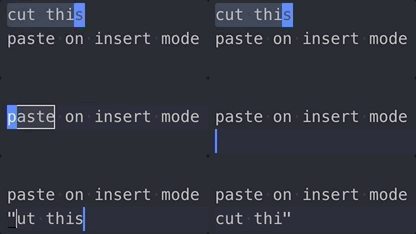
Pasting from the default register in insert mode with dead keys replaces last char with double quotes.
To Reproduce
Steps to reproduce the behavior:
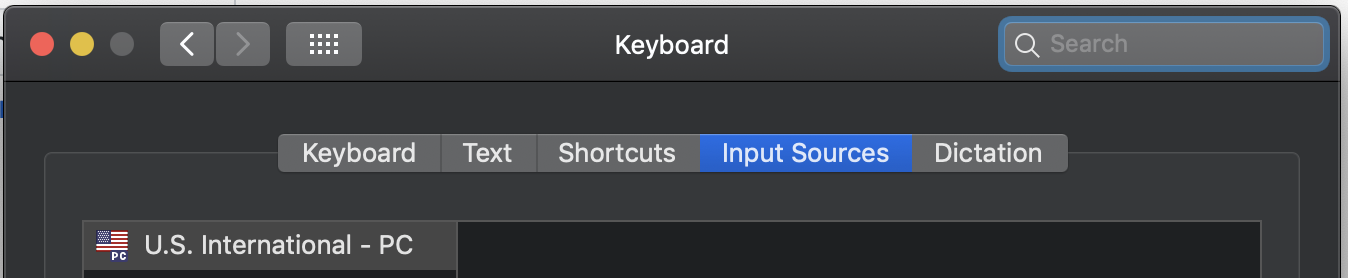
- Enable a US International keyboard on OSX settings
- Yank some text on VSCode
- Enter insert mode
- Paste from the default register
<Ctrl-r>": you have to press space after"due to the international keyboard bindings - The last character will be replaced with double quotes
Expected behavior
The content of the register should be pasted.
Screenshots
Environment (please complete the following information):
- Extension (VsCodeVim) version: 1.1.0
- VSCode version: 1.31.1
- OS: Mojave 10.14
Additional context
This doesn't happen with the regular US keyboard.
Contributor guide
First steps
- Read the whole issue, then the project's contributing guide.
- Comment on the issue to say you are picking it up — it saves two people doing the same work.
- Fork the repository and make your change on a branch.
- Open a pull request that references the issue number.
Research direction
Reproduce this on macOS Mojave with a US International keyboard, VSCode 1.31.1, and VsCodeVim 1.1.0 using the listed paste steps. Trace the insert-mode default-register paste path and verify that the final character is preserved instead of being replaced with double quotes.
Written by the indexing model from the issue text.
Assessment
- Tech stack
- typescript, vscode
- Domain
- developer-experience
- Issue type
- Bug
- Difficulty
- 3/5
- Estimated time
- 1-2 days
- Activity status
- Stale
- Clarity
- Mostly clear
- Newbie friendliness
- 45/100