Selecting with `V` + select all matching + paste only modifies first
Open
Nobody has claimed this yet.
- Dominant language
- TypeScript
- Stars
- 15.2k
- Forks
- 1.5k
- Avg merge
- 3d 18h
- Merged PRs (30d)
- 6
Description
When selecting all matching texts, pasting will only replace the one you were at, and not the rest
To Reproduce
Steps to reproduce the behavior:
- Have a file with the same word many times
- In command mode select the word
- Press Ctrl+Shift+l to select all matches
- Press p
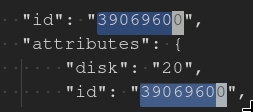
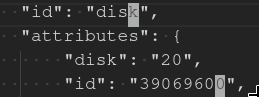
- See error, only the one you had initially selected got replaced
Expected behavior
All matches should have been replaced
Screenshots
Before pasting
After pasting
Environment (please complete the following information):
- Extension (VsCodeVim) version: v1.0.8
- VSCode version: 1.31.1
- OS: Arch Linux
Contributor guide
First steps
- Read the whole issue, then the project's contributing guide.
- Comment on the issue to say you are picking it up — it saves two people doing the same work.
- Fork the repository and make your change on a branch.
- Open a pull request that references the issue number.
Research direction
Start by reproducing the Ctrl+Shift+l and p sequence in VSCodeVim with a file containing repeated words, then trace the selection and paste handling involved in that command path. Done means pasting replaces every selected match rather than only the initially selected word.
Written by the indexing model from the issue text.
Assessment
- Tech stack
- typescript
- Domain
- devtools
- Issue type
- Bug
- Difficulty
- 3/5
- Estimated time
- 1-2 days
- Activity status
- Stale
- Clarity
- Mostly clear
- Newbie friendliness
- 35/100