Automatic Brackets fail with Dead Keys on macOS
Nobody has claimed this yet.
- Dominant language
- TypeScript
- Stars
- 15.2k
- Forks
- 1.5k
- Avg merge
- 3d 18h
- Merged PRs (30d)
- 6
Description
Describe the bug
Automatic brackets do not work for dead keys when VSCodeVim is enabled.
( and ) are on regular keys.
{ and } are typed via dead keys (note the , in the below gif).
To Reproduce
I have no custom VSCodeVim settings, so the only prequisite is a keyboard layout with brackets on dead keys.
Expected behavior
When typing {, the closing counter-part } should automatically appear like it does when typing (.
Screenshots
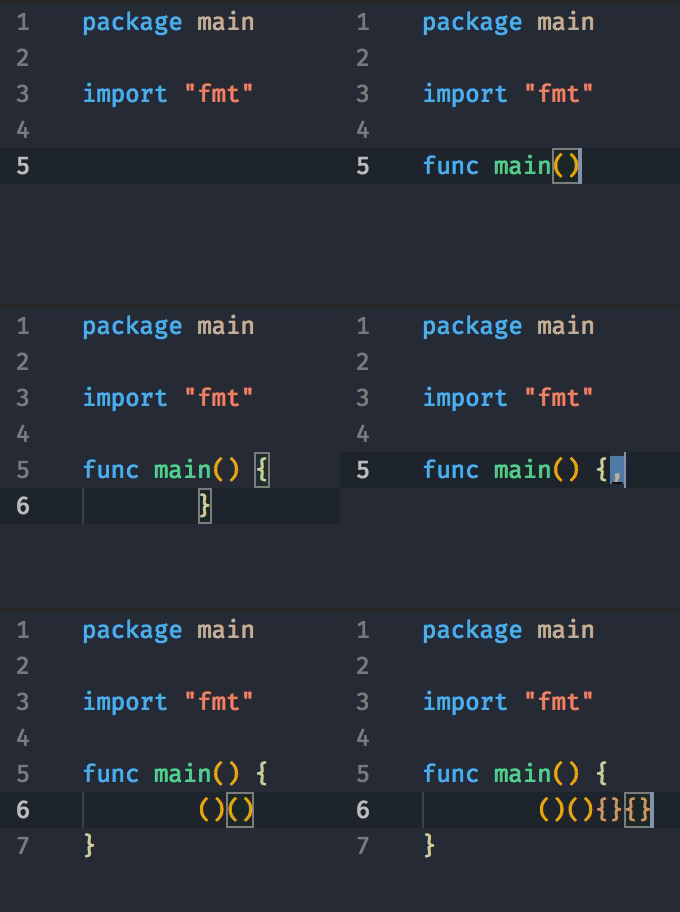
Environment:
- Extension (VsCodeVim) version: 1.08
- VSCode version: 1.31
- OS: macOS High Sierra
Contributor guide
First steps
- Read the whole issue, then the project's contributing guide.
- Comment on the issue to say you are picking it up — it saves two people doing the same work.
- Fork the repository and make your change on a branch.
- Open a pull request that references the issue number.
Research direction
Start by reproducing the issue in VSCodeVim 1.08 on macOS with a keyboard layout that places braces on dead keys, comparing { with the regular-key ( case. Trace the automatic-bracket handling from the keyboard input entry point; done means typing { inserts its closing } as expected while VSCodeVim is enabled.
Written by the indexing model from the issue text.
Assessment
- Tech stack
- typescript
- Domain
- tooling
- Issue type
- Bug
- Difficulty
- 3/5
- Estimated time
- 1-2 days
- Activity status
- Stale
- Clarity
- Mostly clear
- Newbie friendliness
- 42/100