Navigate views(panels) by shortcuts in explorer
Nobody has claimed this yet.
- Dominant language
- TypeScript
- Stars
- 15.2k
- Forks
- 1.5k
- Avg merge
- 3d 18h
- Merged PRs (30d)
- 6
Description
Is this a BUG REPORT or FEATURE REQUEST? (choose one):
FEATURE REQUEST
What happened:
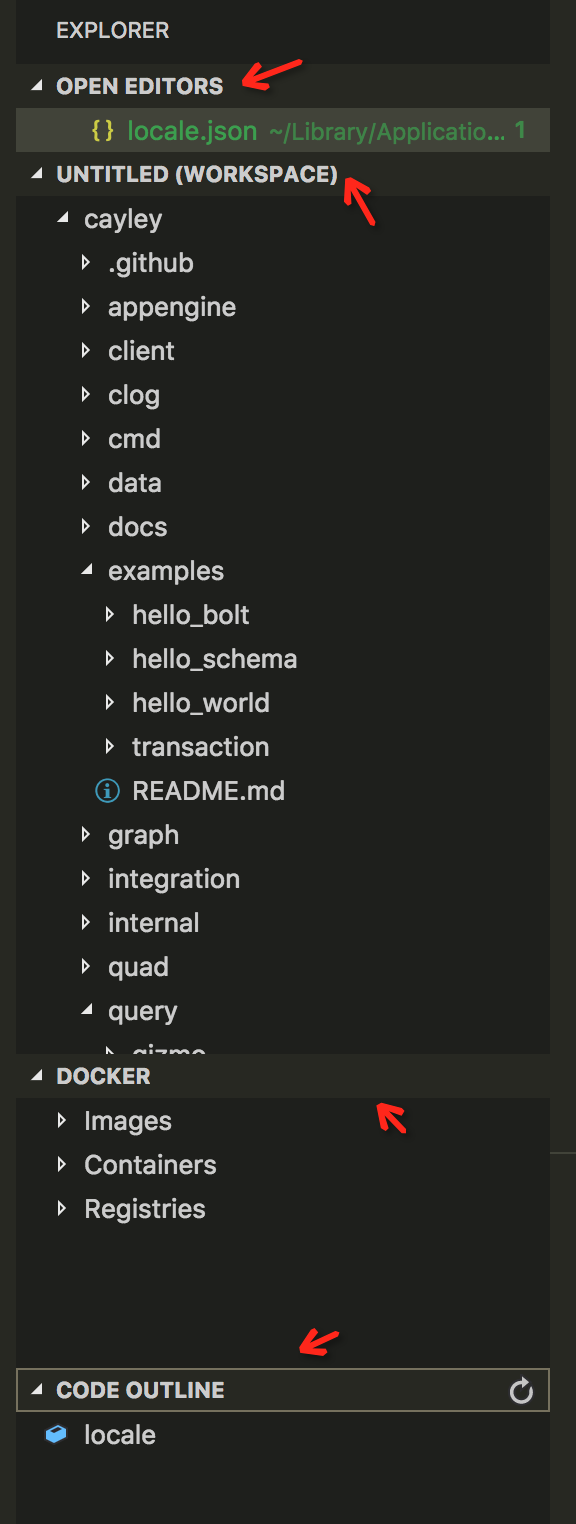
I have installed several extensions which could provide multiple views in explorer. While I was migrated from vim to vscode, used to operate the editor by keyboards through shortcuts. I found that it's hard to navigate the views in explorer by shortcuts, and have searched for a long while got nothing solutions on issues. Is there any keybindings could help me out with the issue?
And try to navigate between the views like those red arrows in screenshot.
What did you expect to happen:
Try to navigate the views(panels) by using ctrl+w + j (up) or ctrl + w + k (down) the views.
How to reproduce it (as minimally and precisely as possible):
Environment:
- Extension (VsCodeVim) version:
- VSCode version:1.21.1
- OS version:10.12.4
Contributor guide
First steps
- Read the whole issue, then the project's contributing guide.
- Comment on the issue to say you are picking it up — it saves two people doing the same work.
- Fork the repository and make your change on a branch.
- Open a pull request that references the issue number.
Research direction
Start by examining VSCodeVim's keybinding handling and how VS Code exposes navigation between Explorer views or panels. Confirm whether Ctrl+W followed by J/K can target those views, then validate the behavior in the Explorer with multiple extension-provided views.
Written by the indexing model from the issue text.
Assessment
- Tech stack
- typescript, vscode
- Domain
- developer-experience, devtools
- Issue type
- Feature
- Difficulty
- 4/5
- Estimated time
- 3-5 days
- Activity status
- Stale
- Clarity
- Needs clarification
- Newbie friendliness
- 25/100