Add next occurrence bug with single character selections (such as ";")
Nobody has claimed this yet.
- Dominant language
- TypeScript
- Stars
- 15.2k
- Forks
- 1.5k
- Avg merge
- 3d 18h
- Merged PRs (30d)
- 6
Description
Hey @Chillee, wanted to thank you for your awesome work on visual mode selection and add next occurrence! It works much better now, though there is still one small bug remaining that I noticed (for reference, this bug was happening before the 0.9.0 patch as well I believe).
I hope this is clear, but if not please let me know if I can help to provide any more information!
- Click thumbs-up 👍 on this issue if you want it!
- Click confused 😕 on this issue if not having it makes VSCodeVim unusable.
The VSCodeVim team prioritizes issues based on reaction count.
Is this a BUG REPORT or FEATURE REQUEST? (choose one): Bug Report
Environment: MacOS
- VSCode Version: 1.13.1
- VsCodeVim Version: 0.9.0
- OS: MacOS 10.12.5
What happened: When just trying to select end of line semicolons with add next occurrence, the correct selection only lasts for one occurrence. After the second selection, it changes the selection I'm trying to highlight. (It appears to go back one character add this previous character to the search on the second occurrence)
For example, I will select ; in Visual mode, then hit the keyboard shortcut to add next occurrence. It works properly to select the next match. Then, the third time I issue that command, it changes my selection from ; to }; (you can see it also changes in VSCode's search bar at this time).
In another example of this happening, I have the following text:
};

// I should be selected too;
// And Me;
After I select the first semicolon and add next occurrence, it selects the second ; after "too". However, when I add the next occurrence after that, instead of selecting the third ; after "Me" it backs up and selects the too text instead breaking the ability to add any more occurrences.
Here's a GIF showing this in action (Note that my Ctrl+G is mapped to Cmd + D (add next occurrence))
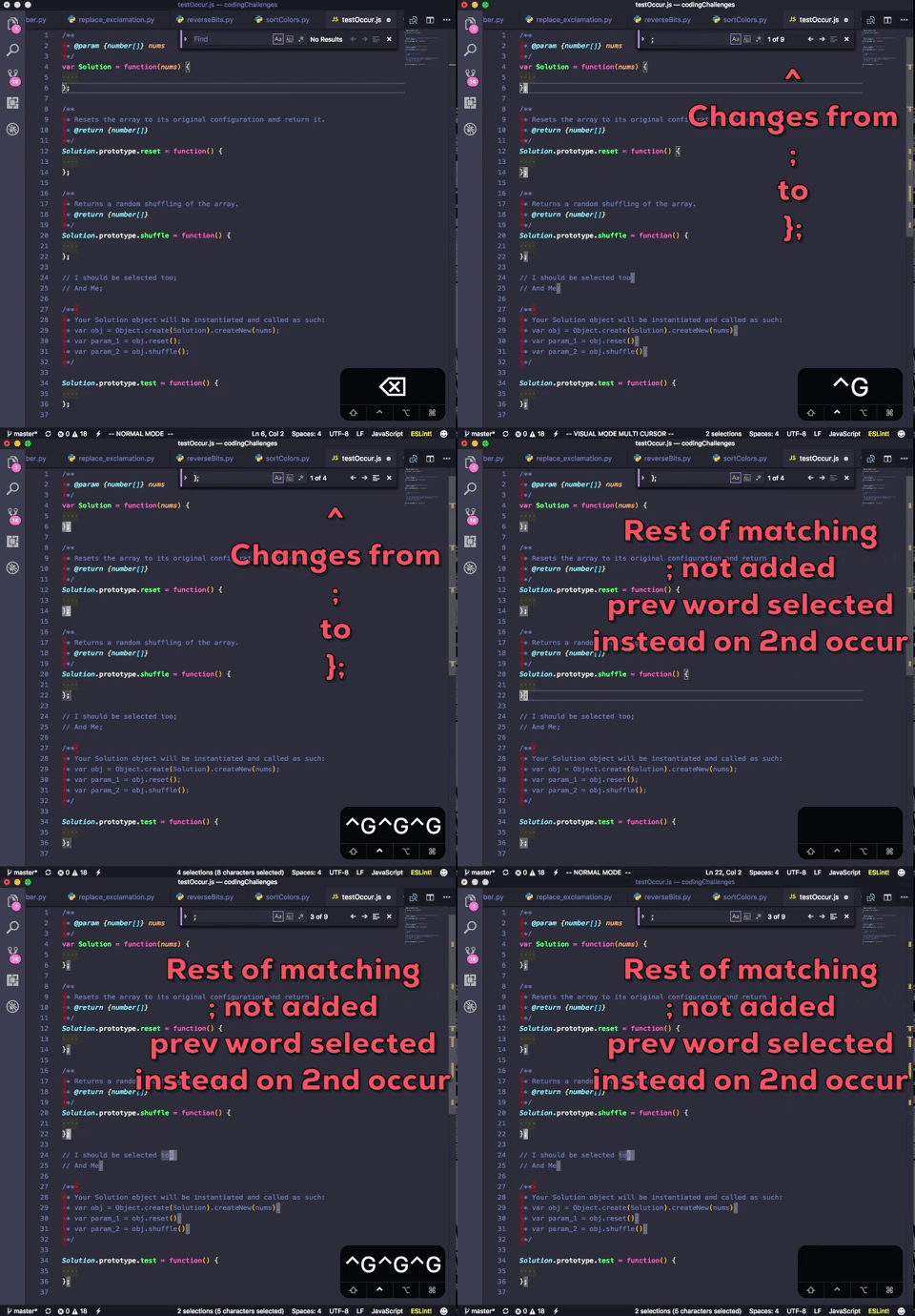
What did you expect to happen: All the proper instances of ; should be selected one at a time, without changing the search selection to a different value. Only ; should be matched, not }; nor should the search value change.
How to reproduce it: Have a file with end of line semicolons coming after closing braces. Select the first semicolon (not including the curly brace) and Add Next Occurrence. This only seems to be happening with one character selections. Feel free to use this example:
/**
 * @param {number[]} nums
 */
var Solution = function(nums) {

};

/**
 * Resets the array to its original configuration and return it.
 * @return {number[]}
 */
Solution.prototype.reset = function() {

};

/**
 * Returns a random shuffling of the array.
 * @return {number[]}
 */
Solution.prototype.shuffle = function() {

};

// I should be selected too;
// And Me;

/**
 * Your Solution object will be instantiated and called as such:
 * var obj = Object.create(Solution).createNew(nums);
 * var param_1 = obj.reset();
 * var param_2 = obj.shuffle();
 */

Solution.prototype.test = function() {

};
Contributor guide
First steps
- Read the whole issue, then the project's contributing guide.
- Comment on the issue to say you are picking it up — it saves two people doing the same work.
- Fork the repository and make your change on a branch.
- Open a pull request that references the issue number.
Research direction
Reproduce the add-next-occurrence command in VS Code using the supplied semicolon examples, starting with a single-character visual selection after a closing brace. Inspect the add-next-occurrence and visual-mode entry points, then verify that repeated commands keep only the semicolon in the search and select each later occurrence.
Written by the indexing model from the issue text.
Assessment
- Tech stack
- typescript, vscode
- Domain
- tooling
- Issue type
- Bug
- Difficulty
- 3/5
- Estimated time
- 1-2 days
- Activity status
- Stale
- Clarity
- Mostly clear
- Newbie friendliness
- 35/100