Running "pm2 status" during PowerShell remote session returns gibberish
Nobody has claimed this yet.
- Dominant language
- JavaScript
- Stars
- 43.3k
- Forks
- 2.7k
- PR merge metrics
- No merged PRs in 30d
Description
What's going wrong?
I receive gibberish if I try to run pm2 status or pm2 monit in a remote powershell session to the computer where PM2 is installed. Well, pm2 status returns gibberish, but pm2 monit does nothing.
How could we reproduce this issue?
In a Windows environment where you're a full-on Admin, start a remote powershell session to the system that is running PM2.
enter-pssession -computer MYWEBSVR
run either pm2 status or pm2 monit
I should note that, on the actual server/host itself, both status and monit work fine.
OH, also: PM2/Node/NPM are part of the appropriate path/system env vars on the destination server.
Supporting information
Notice that it's primarily the grid lines.
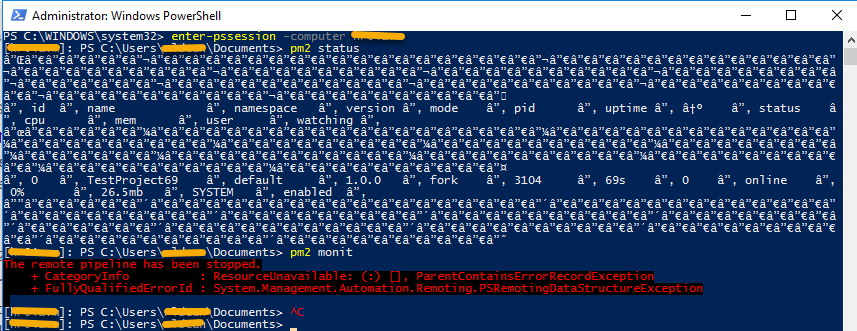
--- PM2 report ----------------------------------------------------------------
Date                 : Fri Nov 06 2020 15:03:07 GMT-0500 (Eastern Standard Time)
===============================================================================
--- Daemon -------------------------------------------------
pm2d version         : 4.5.0
node version         : 14.15.0
node path            : not found
argv                 : D:\nodejs\v14.15.0\node.exe,D:\nodejs\npm\node_modules\pm2-windows-service\src\service.js
argv0                : D:\nodejs\v14.15.0\node.exe
user                 : undefined
uid                  : N/A
gid                  : N/A
uptime               : 20min
===============================================================================
--- CLI ----------------------------------------------------
local pm2            : 4.5.0
node version         : 14.15.0
node path            : not found
argv                 : D:\nodejs\v14.15.0\node.exe,D:\nodejs\npm\node_modules\pm2\bin\pm2,report
argv0                : D:\nodejs\v14.15.0\node.exe
user                 : REDACTED
===============================================================================
--- System info --------------------------------------------
arch                 : x64
platform             : win32
type                 : Windows_NT
cpus                 : Intel(R) Xeon(R) Gold 6154 CPU @ 3.00GHz
cpus nb              : 4
freemem              : 5904031744
totalmem             : 8589398016
home                 : C:\Users\REDACTED
===============================================================================
--- PM2 list -----------------------------------------------
┌─────┬──────────────────┬─────────────┬─────────┬─────────┬──────────┬────────┬──────┬───────────┬──────────┬──────────
┬──────────┬──────────┐
│ id  │ name             │ namespace   │ version │ mode    │ pid      │ uptime │ ↺    │ status    │ cpu      │ mem
│ user     │ watching │
├─────┼──────────────────┼─────────────┼─────────┼─────────┼──────────┼────────┼──────┼───────────┼──────────┼──────────
┼──────────┼──────────┤
│ 0   │ TestProject69    │ default     │ 1.0.0   │ fork    │ 3104     │ 20m    │ 0    │ online    │ 0%       │ 27.2mb
│ SYSTEM   │ enabled  │
└─────┴──────────────────┴─────────────┴─────────┴─────────┴──────────┴────────┴──────┴───────────┴──────────┴──────────
┴──────────┴──────────┘
===============================================================================
--- Daemon logs --------------------------------------------
D:\nodejs\pm2\pm2.log last 20 lines:
PM2        | 2020-11-06T13:24:06: PM2 log: pid=6576 msg=process killed
PM2        | 2020-11-06T13:24:06: PM2 log: App [TestProject69:0] starting in -fork mode-
PM2        | 2020-11-06T13:24:06: PM2 log: App [TestProject69:0] online
PM2        | 2020-11-06T13:24:13: PM2 log: Change detected on path app.js for app TestProject69 - restarting
PM2        | 2020-11-06T13:24:13: PM2 log: Stopping app:TestProject69 id:0
PM2        | 2020-11-06T13:24:14: PM2 log: App [TestProject69:0] exited with code [1] via signal [SIGINT]
PM2        | 2020-11-06T13:24:14: PM2 log: pid=4740 msg=process killed
PM2        | 2020-11-06T13:24:14: PM2 log: App [TestProject69:0] starting in -fork mode-
PM2        | 2020-11-06T13:24:14: PM2 log: App [TestProject69:0] online
PM2        | 2020-11-06T13:24:53: PM2 log: Change detected on path app.js for app TestProject69 - restarting
PM2        | 2020-11-06T13:24:53: PM2 log: Stopping app:TestProject69 id:0
PM2        | 2020-11-06T13:24:53: PM2 log: App [TestProject69:0] exited with code [1] via signal [SIGINT]
PM2        | 2020-11-06T13:24:53: PM2 log: pid=7368 msg=process killed
PM2        | 2020-11-06T13:24:53: PM2 log: App [TestProject69:0] starting in -fork mode-
PM2        | 2020-11-06T13:24:53: PM2 log: App [TestProject69:0] online
PM2        | 2020-11-06T14:35:19: PM2 log: [Watch] Stop watching TestProject69
PM2        | 2020-11-06T14:35:19: PM2 log: Stopping app:TestProject69 id:0
PM2        | 2020-11-06T14:35:20: PM2 log: App [TestProject69:0] exited with code [1] via signal [SIGINT]
PM2        | 2020-11-06T14:35:20: PM2 log: pid=6188 msg=process killed
PM2        | 2020-11-06T14:35:20: PM2 log: PM2 successfully stopped
Contributor guide
First steps
- Read the whole issue, then the project's contributing guide.
- Comment on the issue to say you are picking it up — it saves two people doing the same work.
- Fork the repository and make your change on a branch.
- Open a pull request that references the issue number.
Research direction
Start by reproducing the issue with Enter-PSSession, then run the pm2 status and pm2 monit entry points in the remote PowerShell session and compare them with the same commands on the host. Trace the CLI output and monitoring behavior to identify the remote-terminal difference; done means both commands render and operate correctly remotely without changing their local behavior.
Written by the indexing model from the issue text.
Assessment
- Tech stack
- javascript, nodejs, powershell
- Domain
- cli, observability-sre
- Issue type
- Bug
- Difficulty
- 3/5
- Estimated time
- 1-2 days
- Activity status
- Stale
- Clarity
- Mostly clear
- Newbie friendliness
- 35/100