Missing page header when using keyboard navigation
Open
@PetyaMarkovaBogdanova is already working on this.
Since Mar 30, 2021.
enhancement
- Dominant language
- JavaScript
- Stars
- 3.3k
- Forks
- 1.3k
- PR merge metrics
- No merged PRs in 30d
Description
OpenUI5 version:
Tested on 1.71.32 and 1.85.5
Browser/version (+device/version):
latest chrome
Steps to reproduce the problem:
- Create a semantic page (sap.f.semantic)
- Set property headerPinnable of semantic page to false
- Add filterbar (sap.ui.comp.filterbar) to headerContent of semantic page
- Add Table (sap.m.table) to content area of semantic page
- Disable growing features on table, so we immediately see all table items
- Add items to that table, until the vertical scrollbar appears
- Add a Select Control (sap.m.Select) to filterbar
- For the next step, only use the keyboard "tab" and "arrow" keys.
- Use the select control to filter the table down to only a few items, so we don't have a vertical scrollbar.
Its important to use the "tab" key to select a filter item. Do not use "enter" key.
What is the expected result?
After filtering the table items, the header of the semantic page, including filterbar, should still be visible.
What happens instead?
The header of the semantic page, including filterbar, is not visible.
Any other information?
This bug only happens when using the keyboard, and the semantic page has headerPinnable set to false.
But it is still concerning, especially for accessibility reasons.
GIF showing the problem:
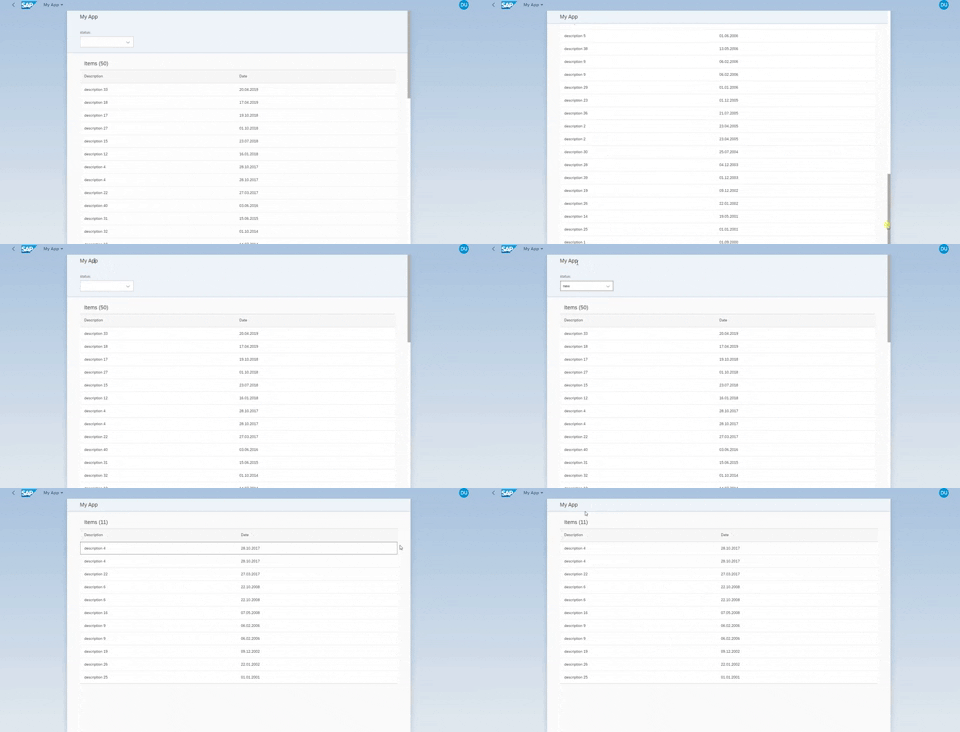
XML Code:
<mvc:View xmlns:core="sap.ui.core" xmlns:mvc="sap.ui.core.mvc" xmlns="sap.m" xmlns:semantic="sap.f.semantic"
	xmlns:fb="sap.ui.comp.filterbar" controllerName="myapp.controller.Main" height="100%">
	<semantic:SemanticPage showFooter="false" toggleHeaderOnTitleClick="false" busyIndicatorDelay="0"
		titleAreaShrinkRatio="0:0:2" headerPinnable="false">
		<semantic:titleHeading>
			<Title text="My App"></Title>
		</semantic:titleHeading>
		<semantic:headerContent>
			<fb:FilterBar id="filterBar" showFilterConfiguration="false"
			 filterBarExpanded="true" showClearOnFB="false" showClearButton="false" showGoOnFB="false"
				useToolbar="false" filterContainerWidth="100px" showRestoreButton="false">
				<fb:filterGroupItems>
					<fb:FilterGroupItem groupName="Basic" name="status" label="status" visibleInFilterBar="true">
						<fb:control>
							<Select id="statusSelect" change=".onFilterChangeApplyFilters">
								<items>
									<core:Item text="" key="all"></core:Item>
									<core:Item text="new" key="new"></core:Item>
									<core:Item text="old" key="old"></core:Item>
								</items>
							</Select>
						</fb:control>
					</fb:FilterGroupItem>
				</fb:filterGroupItems>
			</fb:FilterBar>
		</semantic:headerContent>
		<semantic:content>
			<Table id="table"
				items="{path: '/LIST'}"
				growing="false" growingScrollToLoad="false">
				<headerToolbar>
					<OverflowToolbar>
						<Title id="tableTitle" titleStyle="H3" text="{viewModel>/tableTitle}"/>
						<ToolbarSpacer/>
					</OverflowToolbar>
				</headerToolbar>
				<columns>
					<Column>
						<Text text="Description" id="colDescription"/>
					</Column>
					<Column minScreenWidth="Tablet" demandPopin="true" id="colDate">
						<Text text="Date"/>
					</Column>
				</columns>
				<items>
					<ColumnListItem vAlign="Middle">
						<cells>
							<Text text="{description}" id="description"/>
							<Text text="{ path:'date', type:'sap.ui.model.odata.type.DateTime', constraints: { displayFormat: 'Date' }}" id="date"/>
						</cells>
					</ColumnListItem>
				</items>
			</Table>
		</semantic:content>
	</semantic:SemanticPage>
</mvc:View>
Contributor guide
First steps
- Read the whole issue, then the project's contributing guide.
- Comment on the issue to say you are picking it up — it saves two people doing the same work.
- Fork the repository and make your change on a branch.
- Open a pull request that references the issue number.
Assessment
This issue has not been assessed yet.