Bootstrap command is hard-truncated and clipboard copy fails silently on headless hosts
Nobody has claimed this yet.
- Dominant language
- Go
- Stars
- 12
- Forks
- 3
- Avg merge
- 1h 10m
- Merged PRs (30d)
- 2
Description
Describe the bug
Bootstrap command is hard-truncated and clipboard copy fails silently on headless hosts
-
The command is hard-truncated at a fixed length in the display, regardless of the actual terminal size (
internal/tui/bootstrap.go,viewGenerateKey()):// For display, show a truncated version if it's too long displayCommand := command if len(command) > 80 { displayCommand = command[:77] + "..." } commandBox := dialogBoxStyle.Copy(). BorderForeground(colorHighlight). Width(80). Render(displayCommand)The command (200+ characters once the SSH key is embedded) is cut to 77 characters plus
...; the rest — including part of the key — is never shown anywhere. -
The "press 'c' to copy" clipboard shortcut fails silently on a headless host, same file,
handleGenerateKeyKeys():case "c": if m.session != nil { command := m.session.GetBootstrapCommand() if err := clipboard.WriteAll(command); err == nil { m.commandCopied = true } } return m, nilclipboard.WriteAll(github.com/atotto/clipboard) requires
xclip/xsel(X11) orwl-copy(Wayland) on Linux — none of which are meaningful on a headless server reached over SSH, since there is no display server to copy into regardless of what's installed. The returned error is silently discarded: no message is shown, so it just looks like nothing happened.
Combined, on a headless host there is no way to retrieve the full temporary public key from the TUI at all.
To Reproduce
Steps to reproduce the behavior:
- Run Keymaster's TUI (v1.5.1) over SSH on a headless Linux host (no X11/Wayland session)
- Go to "Manage Accounts" → add account → check "Bootstrap this host"
- On the "Bootstrap New Host" screen, look at the command box
- Press
cto try to copy the command to the clipboard - See that the command is cut off with
...and that pressingcproduces no visible feedback and does not actually copy anything
Expected behavior
- The full command (including the complete public key) should be visible somewhere in the TUI, even if it has to wrap over several lines
- If the clipboard copy cannot work (no display server available), that should be surfaced to the user instead of failing silently
Screenshots
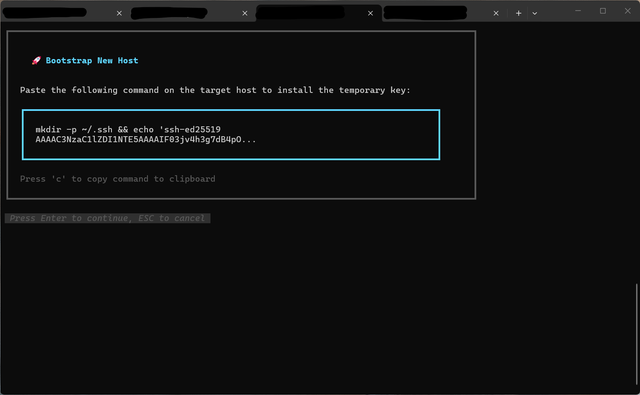
Desktop (please complete the following information):
- Device: Raspberry Pi (aarch64/arm64), headless, accessed over SSH
- OS: Debian
- Go version: go1.25.1 (confirmed via
go version -mon the official release binary) - Version: v1.5.1 (official release binary, linux/arm64)
Additional context
A minimal fix for issue 1 was built and tested end-to-end against v1.5.1 on the affected host: removing the truncation block and rendering the full command string directly lets the existing lipgloss Width(80) box wrapit over several lines instead of cutting it off — confirmed working.
One caveat found while testing this fix: lipgloss's wrap inserts an actual newline character into the rendered string, not just a visual line break, so the key value can end up split by a real \n with no surrounding whitespace. Retyping the command by hand still works fine, but a more complete fix would probably size the box to the real terminal width (via tea.WindowSizeMsg, not currently tracked in bootstrapModel) and/or avoid embedding a hard line break in text that might later be selected/copied.
For issue 2, at minimum surfacing the clipboard error (e.g. "clipboard unavailable on this host") would avoid the "nothing happened" confusion.
OSC 52 (terminal-side clipboard, works transparently over SSH) could also be considered as a fallback — a transitive dependency (github.com/aymanbagabas/go-osc52) is already present in the dependency tree via other charmbracelet packages.
Happy to open a PR with the issue 1 fix (and/or the silent-failure fix for issue 2) if useful.
Contributor guide
First steps
- Read the whole issue, then the project's contributing guide.
- Comment on the issue to say you are picking it up — it saves two people doing the same work.
- Fork the repository and make your change on a branch.
- Open a pull request that references the issue number.
Research direction
Start in internal/tui/bootstrap.go, reading viewGenerateKey() for command rendering and handleGenerateKeyKeys() for the clipboard shortcut. Reproduce the Bootstrap New Host flow over SSH on a headless Linux host, then verify the full command is accessible and clipboard failures are visible to the user without breaking command retrieval.
Written by the indexing model from the issue text.
Assessment
- Tech stack
- go, linux
- Domain
- cli, operating-systems
- Issue type
- Bug
- Difficulty
- 4/5
- Estimated time
- 3-5 days
- Activity status
- Active
- Clarity
- Mostly clear
- Newbie friendliness
- 62/100