Web 内存泄露-求解:Electron web 使用 setComposition 去切换 PAG,每次播放完不会释放内存,导致内存逐渐变大,内存泄露,然后页面白屏,应用就不能使用了
Open
@kevingpqi123 is already working on this.
Since Feb 27, 2025.
- Dominant language
- HTML
- Stars
- 5.8k
- Forks
- 531
- Avg merge
- 8d 55m
- Merged PRs (30d)
- 17
Description
【版本信息】
libpag SDK 版本:4.2.84
ffavc SDK:1.0.2
chrome版本:108.0.5359.215
electron版本: 22.3.27
【平台信息】
Web 浏览器
【预期的表现】
播放完动画,能正常释放内存
【实际的情况】
内存泄露严重,多次频繁调用 setComposition 会内存一直增加,导致泄露,页面白屏,无法使用
【Demo及附件】
-
应用刚打开内存 200MB

-
疯狂播放 PAG 后到 800MB => 1000MB ,超出 1G 后内存泄露白屏
-
链接:https://pica.zhimg.com/v2-51541d7799dd1bbde755bbe845ca07df.png
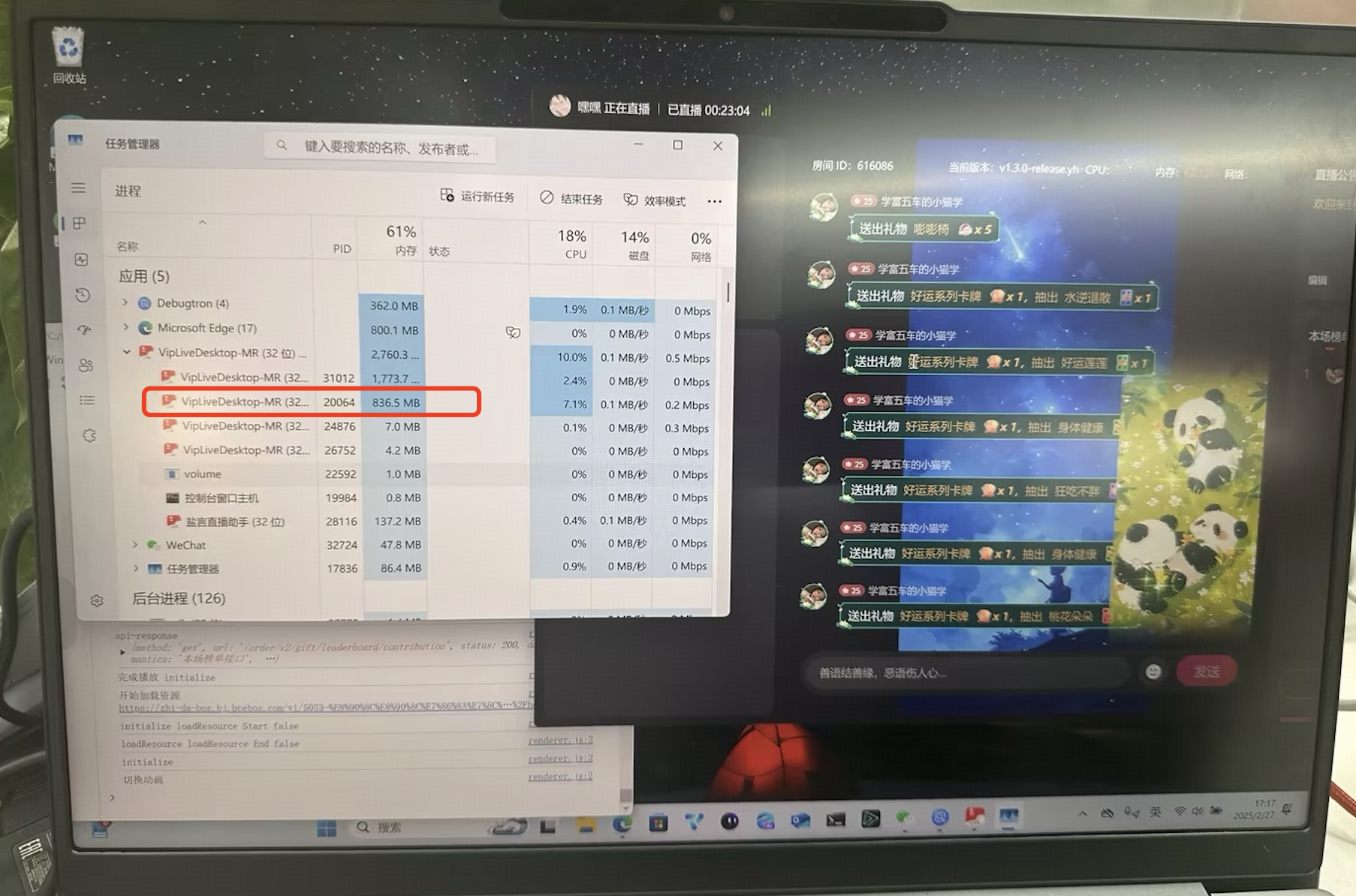
-
视频链接:https://zhstatic.zhihu.com/vip-fe/live/06cdabf5b00c5329e882f568b00732a2.mov
方案一 代码,也是上图使用代码
  const initialize = async (buffer: ArrayBuffer) => {
      console.log('initialize');
      try {
        if (timerRef.current) {
          clearTimeout(timerRef.current);
          timerRef.current = null;
        }

        // 重置状态
        isAnimationEndedRef.current = false;

        const { pag, ffavc } = await PAGInitializer.getInstance().getRuntime();

        if (isRegisterSoftwareDecoderFactory) {
          pag.registerSoftwareDecoderFactory(ffavc);
        }

        // 加载新的 PAGFile
        const newPagFile = await pag.PAGFile.load(buffer);
        pagFileRef.current = newPagFile;

        const canvas = canvasRef.current!;

        // 如果 pagView 不存在,则创建新的实例
        if (!pagViewRef.current) {
          console.log('创建新的实例');
          canvas.width = newPagFile.width();
          canvas.height = newPagFile.height();

          const pagViewInstance = await pag.PAGView.init(newPagFile, canvas, {
            firstFrame: false,
            useCanvas2D: true,
            useScale: false,
          });

          if (pagViewInstance) {
            pagViewRef.current = pagViewInstance;
            pagViewRef.current.removeListener(
              'onAnimationEnd',
              onAnimationEndHandler,
            );
            pagViewRef.current.addListener(
              'onAnimationEnd',
              onAnimationEndHandler,
            );
          }
          pagViewRef.current?.setRepeatCount(loop ? 0 : 1);
        } else {
          console.log('切换动画');
          // 如果 pagView 已存在,使用 setComposition 切换动画
          pagViewRef.current.pause();
          await pagViewRef.current.stop();
          await pagViewRef.current.setComposition(newPagFile);
          pagViewRef.current?.setRepeatCount(loop ? 0 : 1);
          pagViewRef.current?.setProgress(0);
        }

        if (autoplay) {
          await pagViewRef.current?.play();
        }

        initialized?.();

        // 设置超时计时器
        timerRef.current = setTimeout(() => {
          if (!isAnimationEndedRef.current) {
            console.log('Animation ended by timeout');
            onAnimationEndHandler();
          }
        }, timeout);
      } catch (error: any) {
        logger.error('动画资源加载失败', error);
      }
    };
Contributor guide
First steps
- Read the whole issue, then the project's contributing guide.
- Comment on the issue to say you are picking it up — it saves two people doing the same work.
- Fork the repository and make your change on a branch.
- Open a pull request that references the issue number.
Assessment
This issue has not been assessed yet.