TeamAmaze / TeamAmaze/AmazeFileManager
Selecting Hidden Files in More Options Menu Opens Empty Window
Open
Nobody has claimed this yet.
Area-HiddenFiles
Area-UIUX
Issue-Bug
- Dominant language
- Kotlin
- Stars
- 6.4k
- Forks
- 1.7k
- Avg merge
- 3d 9h
- Merged PRs (30d)
- 1
Description
Expected Behavior
Choosing the Hidden Files option in the More Options menu brings up a window listing hidden files.
Actual Behavior
Choosing the Hidden Files option in the More Options menu brings up a window with no information in it.
How to Reproduce
- Launch Amaze File Manager 3.2.1 on Android 8.1.0
- Select the 3 Horizontal Lines Icon in the Upper Left
- Toggle 'Show Hidden Files and Folders' to 'On'
- Go to a Directory containing Hidden Files
- Select the 3 Vertical Dots Icon in the Upper Right
- Select 'Hidden Files'
Device: Pixel 2 XL
OS: Android 8.1.0
App Version: 3.2.1
Recording of the Bug
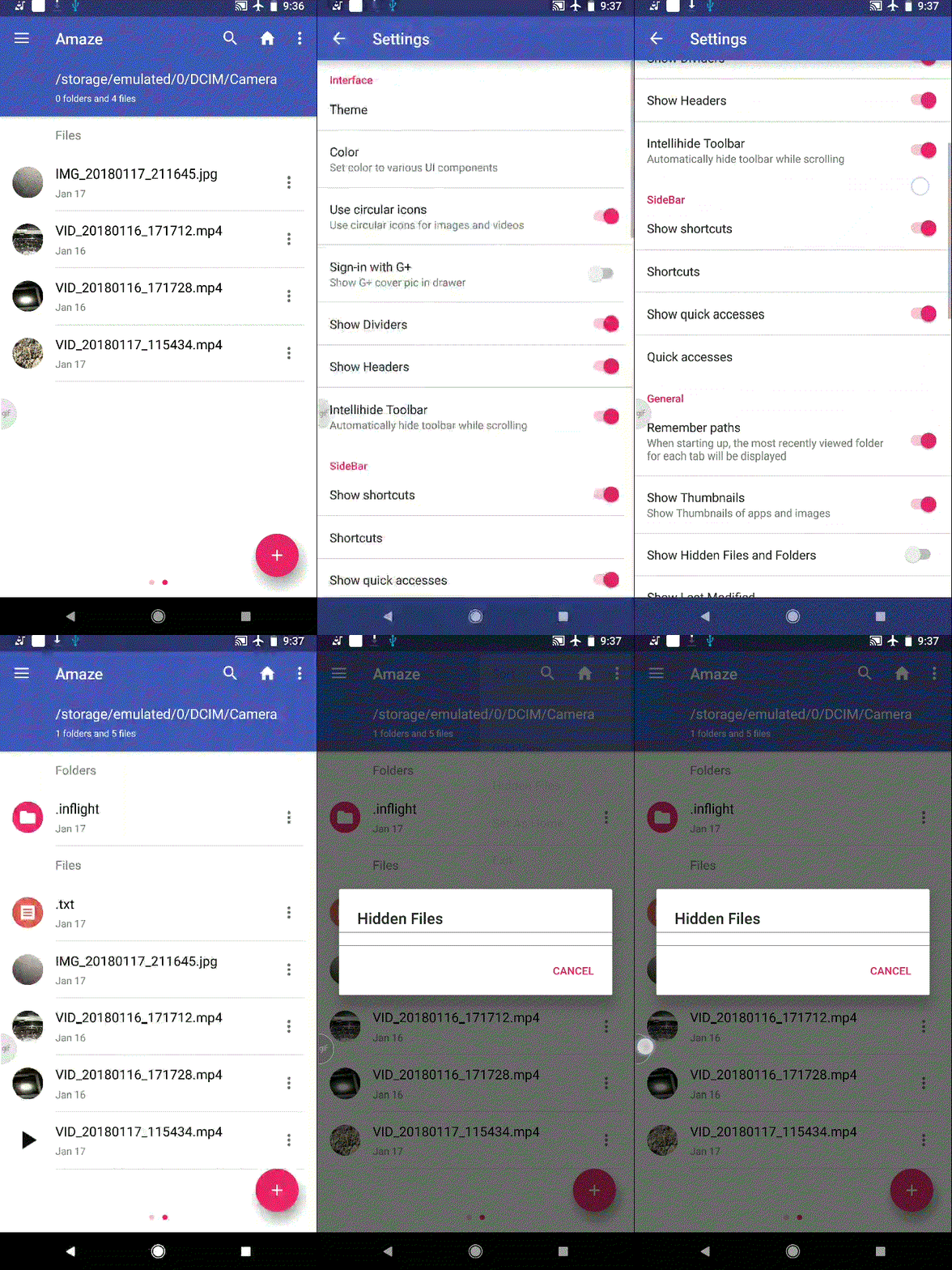
Posted on Utopian.io - Rewarding Open Source Contributors
Contributor guide
First steps
- Read the whole issue, then the project's contributing guide.
- Comment on the issue to say you are picking it up — it saves two people doing the same work.
- Fork the repository and make your change on a branch.
- Open a pull request that references the issue number.
Research direction
Reproduce the issue on Android using the listed steps, then trace the More Options menu's Hidden Files action and the window it opens. Verify the fix by confirming that the window lists hidden files in a directory where they are enabled and present.
Written by the indexing model from the issue text.
Assessment
- Tech stack
- android, kotlin
- Domain
- mobile
- Issue type
- Bug
- Difficulty
- 3/5
- Estimated time
- 1-2 days
- Activity status
- Quiet
- Clarity
- Mostly clear
- Newbie friendliness
- 66/100