TeamAmaze / TeamAmaze/AmazeFileManager
The decision / condition of showing sidebar permanently on tablet?
Nobody has claimed this yet.
- Dominant language
- Kotlin
- Stars
- 6.4k
- Forks
- 1.7k
- Avg merge
- 3d 9h
- Merged PRs (30d)
- 1
Description
I have two Android tablets (Both installed Amaze file manager 3.3.4, via Google Play):
- [left] ASUS ZenPad 3s 10 (P027), resolution = (1536, 2048), width / height ratio = 0.75
- [right] Sansumg Galaxy Tab S6 (SM-T860), resolution = (1600, 2560), width / height ratio = 0.625
The previous one (ZenPad) has smaller resolution, but can always show the sidebar permantely; while the later one has larger resolution, but can't show like that, very inconvenient for a tablet:
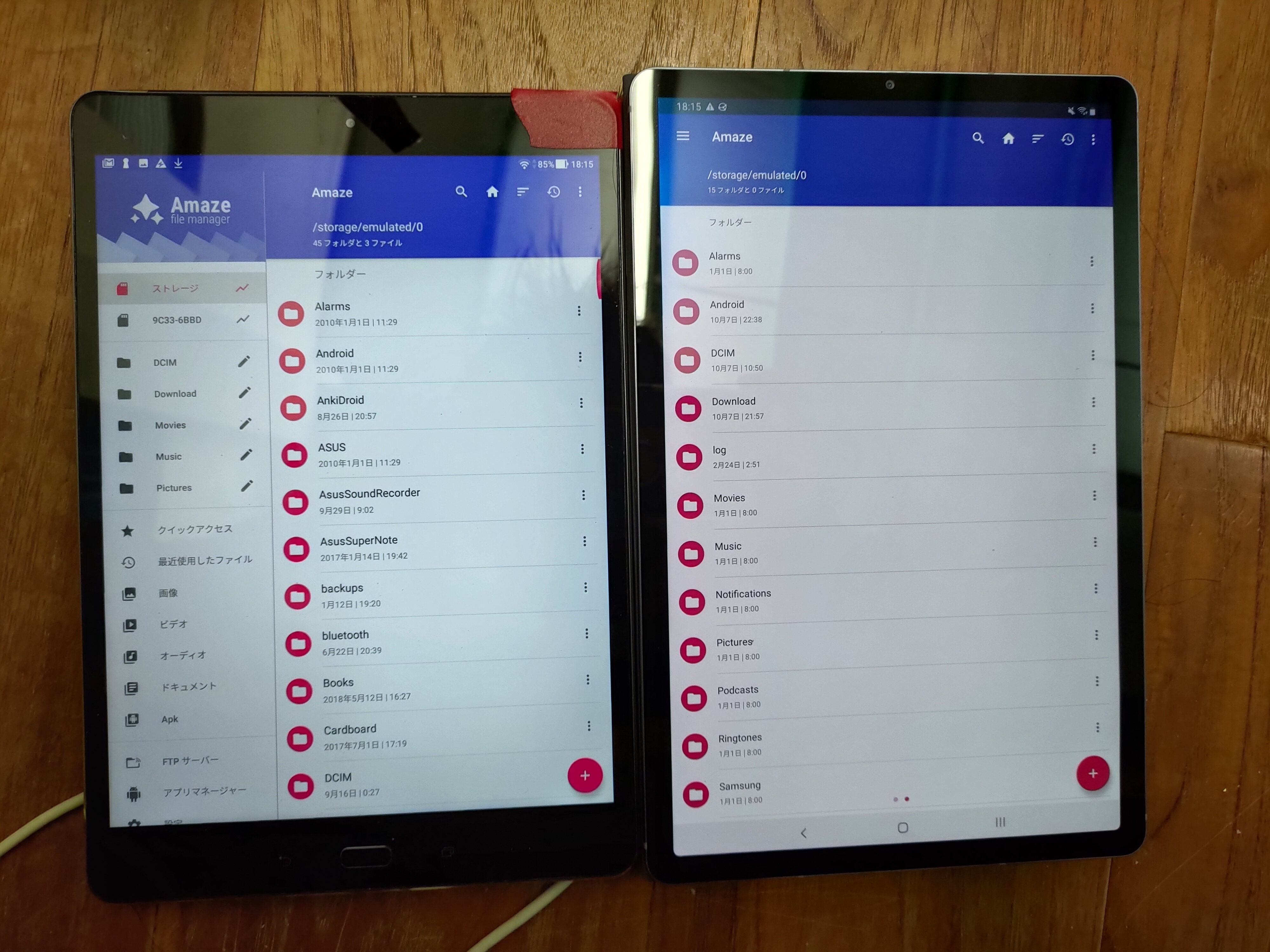
BTW, the behavior of mouse right clicking on file should be showing the menu of it instead of back to last page, I think.
Contributor guide
First steps
- Read the whole issue, then the project's contributing guide.
- Comment on the issue to say you are picking it up — it saves two people doing the same work.
- Fork the repository and make your change on a branch.
- Open a pull request that references the issue number.
Research direction
No source files or tests are named. Reproduce the sidebar and right-click behavior on the two tablet configurations, then locate the relevant tablet layout and interaction entry points; done means the intended sidebar visibility rule is applied and right-click opens the file menu.
Written by the indexing model from the issue text.
Assessment
- Tech stack
- android, kotlin
- Domain
- mobile
- Issue type
- Bug
- Difficulty
- 4/5
- Estimated time
- 3-5 days
- Activity status
- Stale
- Clarity
- Needs clarification
- Newbie friendliness
- 25/100