TASEmulators / TASEmulators/BizHawk
ffmpeg dumper with "Capture OSD" creates the first segment with 0 frames in it
Nobody has claimed this yet.
- Dominant language
- C#
- Stars
- 2.8k
- Forks
- 468
- PR merge metrics
- No merged PRs in 30d
Description
Summary
As shown here in this GIF:
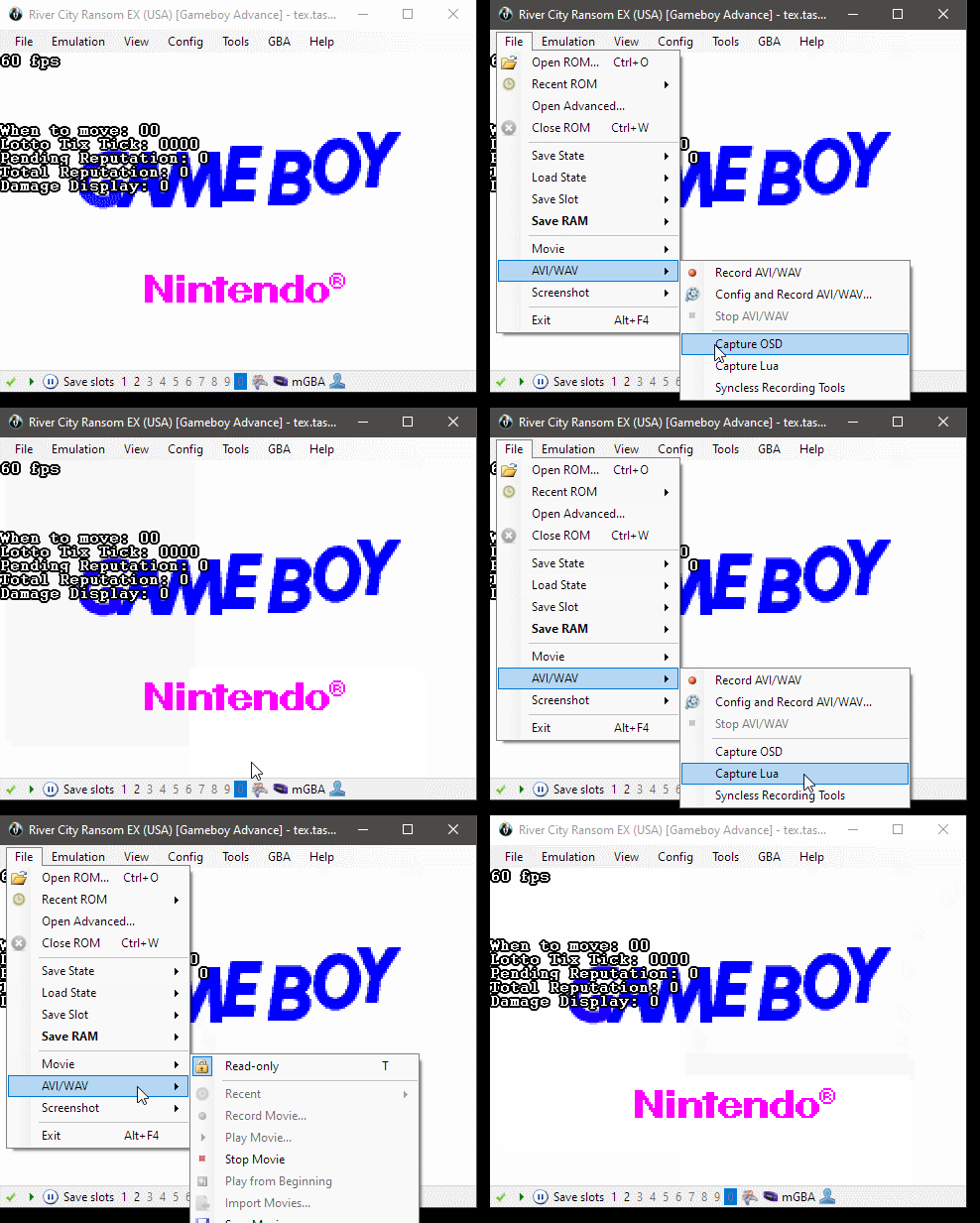
I'm attempting to record on-screen display (OSD) text shown from the RAM Watch window. When about to attempt recording, I noticed that the option to "enable Capture OSD" would enable both the "Capture OSD" and the "Capture Lua" option.
Morilli mentioned this looks wrong. And showed a screenshot of a code snippet suggesting it's wrong:
https://github.com/TASEmulators/BizHawk/blob/3c3ab6578e9566a352524574171386b2a1f92dbb/src/BizHawk.Client.EmuHawk/MainForm.Events.cs#L565-L571
After enabling both options, an attempt to make a small test encoding was made, using the FFmpeg writer, with MP4 default configurations and flags.
It produced 2 movie files, which I named as "test", both of which cannot be played back on a Windows Media Player application. I have attached the 2 movie files here:
test.mp4:
https://user-images.githubusercontent.com/6444116/216873377-d56c7f54-90cf-4d8a-9b39-33bd39cf313a.mp4
test_1.mp4:
https://user-images.githubusercontent.com/6444116/216873378-50e1e34f-c329-457b-92ec-6240a7d79587.mp4
I used the game River City Ransom EX, with a simple RAM Watch properties file (.WCH file, compressed into a ZIP file)
test_ram_watch.zip
SHA-1: 64D0B723AE4EB3F3589B535FB935618F2769229F
CRC32: 8686436E
Thus far, only tested in Bizhawk 2.9 RC2.
Repro
- In Bizhawk 2.9 RC2, open EmuHawk.
- Open the game, and load it up using TAStudio.
- Open the RAM Watch window, and load the .WCH file into the RAM Watch.
- In the RAM Watch window, enable Settings -> Display Watches on Screen.
- In EmuHawk, begin recording a movie starting at frame 0.
- Begin recording with the default configurations for an MP4 file.
- Record a couple of frames.
- Stop the recording.
- EmuHawk should output 2 MP4 files, one of which is named with a
_1suffix. - Attempt to open any one of the 2 files will result in not being able to play back the movie files.
Output
No known output exceptions nor error log messages.
Host env.
- BizHawk 2.9 RC2; Win10 x64 Pro 21H2; Intel/NVIDIA (Only tested with the release candidate 2 version.)
Contributor guide
First steps
- Read the whole issue, then the project's contributing guide.
- Comment on the issue to say you are picking it up — it saves two people doing the same work.
- Fork the repository and make your change on a branch.
- Open a pull request that references the issue number.
Research direction
Start by reproducing the recording flow in BizHawk 2.9 RC2 with Capture OSD enabled and the provided RAM Watch setup. Inspect src/BizHawk.Client.EmuHawk/MainForm.Events.cs around lines 565-571, then trace the FFmpeg writer's handling of the first segment. Done means a short MP4 recording produces one playable file without a zero-frame segment.
Written by the indexing model from the issue text.
Assessment
- Tech stack
- csharp
- Domain
- desktop
- Issue type
- Bug
- Difficulty
- 4/5
- Estimated time
- 3-5 days
- Activity status
- Stale
- Clarity
- Mostly clear
- Newbie friendliness
- 35/100