TASEmulators / TASEmulators/BizHawk
[🪟] Window position not restored correctly on PC with multiple displays
Nobody has claimed this yet.
- Dominant language
- C#
- Stars
- 2.8k
- Forks
- 468
- PR merge metrics
- No merged PRs in 30d
Description
Summary
I have a dual monitors Windows 10 setup. My primary monitor (Monitor 1) is my laptop monitor. My secondary monitor (Monitor 2) is an external monitor.
My display arrangement looks like this:
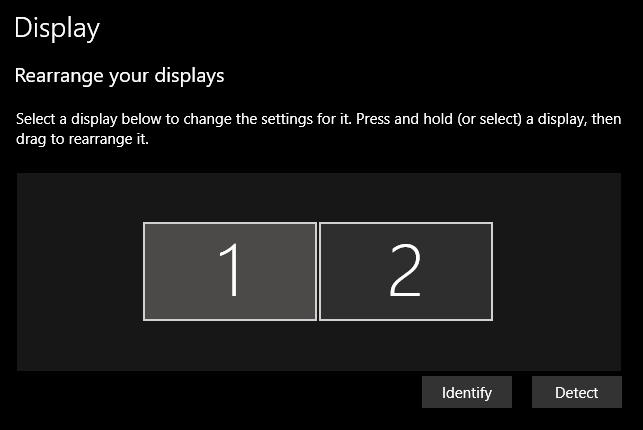
If I run Emuhawk and drag it to Monitor 1, and then I opened the TAStudio and RAM Watch, both of them will appear on Monitor 2, all gathered together on one side. I have a GIF to show what is happening.
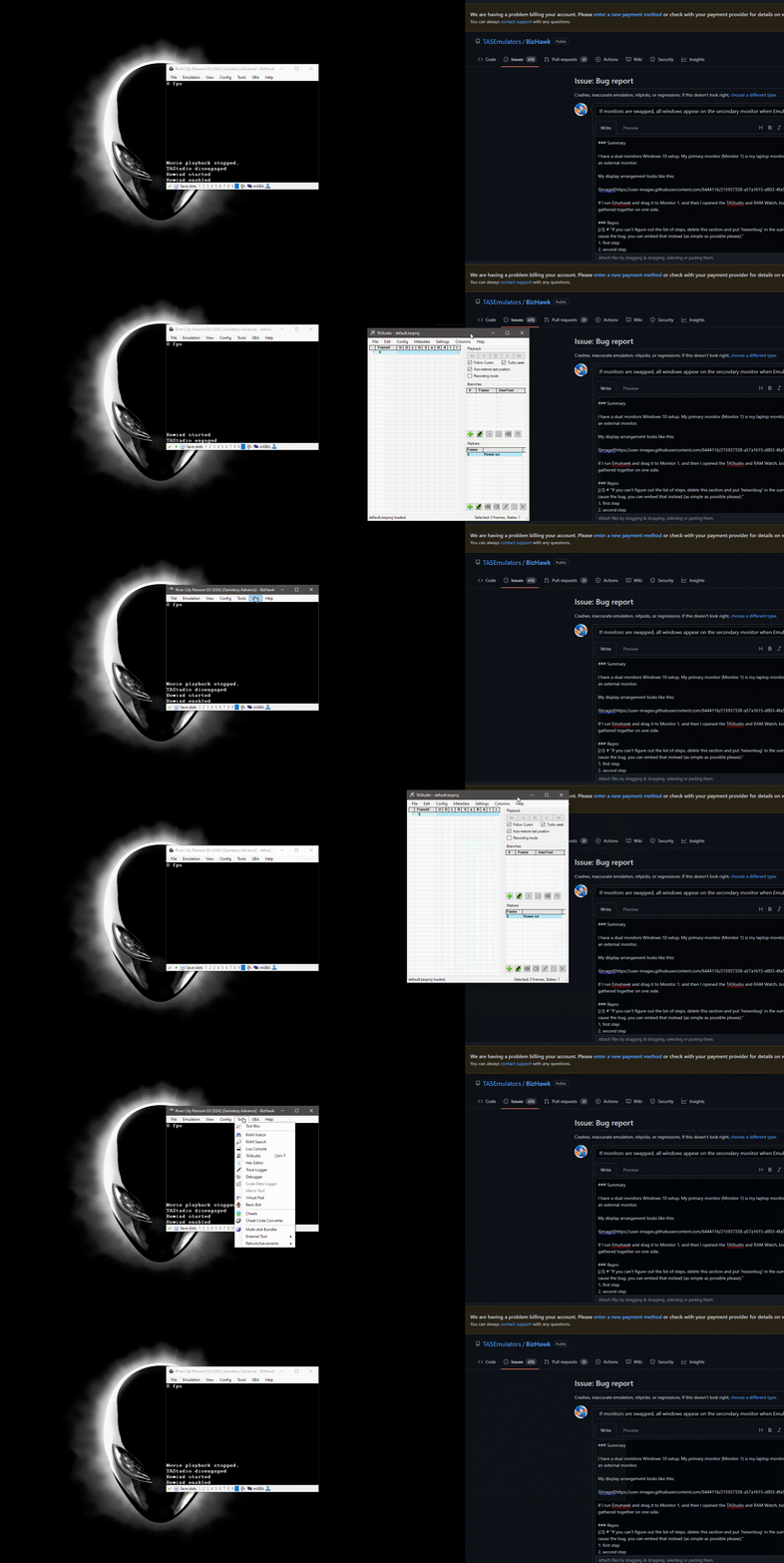
I do not know how to explain this properly, but I will do my best. When TAStudio is closed, the X and Y coordinates, and the width and height of the window are saved somewhere in the config.ini. Somehow, when TAStudio is opened, the X coordinate somehow isn't correct, so it defaults to the minimum value of Monitor 2's width (X: 0). This happens with the same thing with RAM Watch, where the X coordinate value would be limited by the minimum width of Monitor 2.
I am assuming that, because TAStudio is closed in the secondary monitor, and then EmuHawk is closed, the config.ini would store the X and Y coordinates of TAStudio of the secondary monitor, but not taking into account the total width of 2 monitors in a dual monitors setup.
Repro
- Have a dual monitor setup ready.
- Have the dual monitor set up so that the primary monitor is on the left side, and the secondary monitor is on the right side.
- Open EmuHawk.
- Open TAStudio.
- Drag EmuHawk to the primary monitor.
- Drag TAStudio to the secondary monitor.
- Close TAStudio.
- Close EmuHawk, so that the
config.inifile is properly saved. - Open EmuHawk.
- Open TAStudio. TAStudio should appear in the secondary monitor.
- Drag TAStudio to the primary monitor.
- Close TAStudio.
- Open TAStudio again. Observe TAStudio appears in the secondary monitor.
Output
There is no error output. EmuHawk, TAStudio, and RAM Watch windows all behave normally.
Host env.
- BizHawk 2.8; Win10 Pro x64 21H2 Build 19044.2486; Intel/NVIDIA
- BizHawk 2.9 RC2; Win10 Pro x64 21H2 Build 19044.2486; Intel/NVIDIA
- BizHawk dev build at cf0ce0f5; Win10 Pro x64 21H2 Build 19044.2486; Intel/NVIDIA
Contributor guide
First steps
- Read the whole issue, then the project's contributing guide.
- Comment on the issue to say you are picking it up — it saves two people doing the same work.
- Fork the repository and make your change on a branch.
- Open a pull request that references the issue number.
Research direction
Start by reproducing the dual-monitor scenario in the issue, then inspect how TAStudio and RAM Watch window coordinates are saved to and restored from config.ini. Compare the stored positions with the monitors' combined coordinates; done means both windows reopen on the monitor and position where they were last closed.
Written by the indexing model from the issue text.
Assessment
- Tech stack
- csharp
- Domain
- desktop, operating-systems
- Issue type
- Bug
- Difficulty
- 4/5
- Estimated time
- 3-5 days
- Activity status
- Stale
- Clarity
- Mostly clear
- Newbie friendliness
- 35/100