TASEmulators / TASEmulators/BizHawk
When starting playing back a movie, give a warning if ClockRate is incorrect
Nobody has claimed this yet.
- Dominant language
- C#
- Stars
- 2.8k
- Forks
- 468
- PR merge metrics
- No merged PRs in 30d
Description
As in title. Right now, there is nothing, literally nothing telling you if a ClockRate value has been manually falsified in the Header.txt of a .bk2 movie by a malicous user. And it really doesn't help that it's likely to remain unnoticed, even if someone manually checks it. For example, in the screenshot below, there is one file in which I changed the clock rate from 2097152 to 2897152, which leads to a shorter movie length, but not so much shorter to make it too much obviously noticeable.
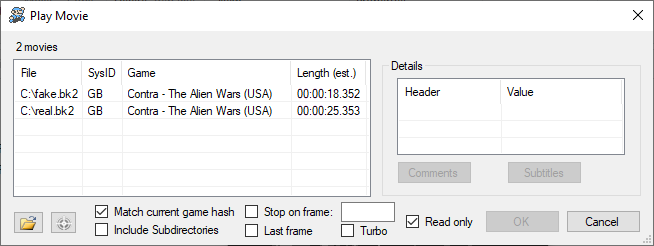
Note that this isn't just a problem for TASing. There are other communities out there that rely on the BizHawk movie recording feature, most notably RTA communities, which may not be as much prepared as TASVideos for automatically detecting a hacked ClockRate value. We don't want to let the credibility of this emulator to be thrown away for a fix so easy to make.
Contributor guide
First steps
- Read the whole issue, then the project's contributing guide.
- Comment on the issue to say you are picking it up — it saves two people doing the same work.
- Fork the repository and make your change on a branch.
- Open a pull request that references the issue number.
Research direction
Start at the movie playback path and inspect how Header.txt values, especially ClockRate, are read and used. Reproduce playback with a deliberately altered ClockRate such as 2897152, then verify that playback gives a clear warning when the value is incorrect.
Written by the indexing model from the issue text.
Assessment
- Tech stack
- csharp
- Domain
- desktop
- Issue type
- Feature
- Difficulty
- 4/5
- Estimated time
- 3-5 days
- Activity status
- Stale
- Clarity
- Mostly clear
- Newbie friendliness
- 38/100