TASEmulators / TASEmulators/BizHawk
RAM Search Changes column does not update
Open
Nobody has claimed this yet.
good first issue
help wanted
Repro: Affects 2.7
Request: Feature/Enhancement
Requires WinForms Designer
Tool: RAM Search
- Dominant language
- C#
- Stars
- 2.8k
- Forks
- 468
- PR merge metrics
- No merged PRs in 30d
Description
Summary
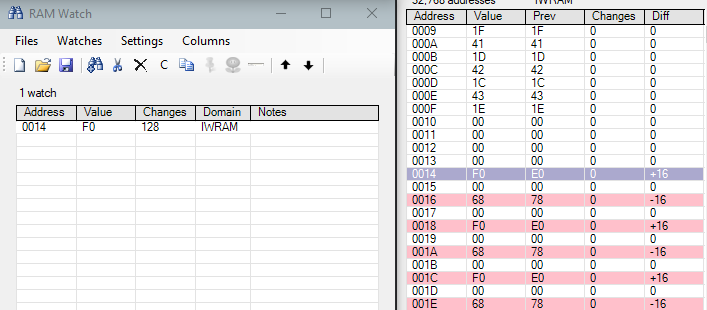
The "Changes" column in BizHawk's RAM Search window does not increment when values in memory update. Setting a watch for the address correctly tracks the changes.
Repro
- Load a Gameboy Advance Rom (I used Pokémon Leaf Green in the screenshot)
- Open the RAM Search and look at an area of memory (I used the top of IWRAM for the screenshot)
- Find an easy-to-control address and set a watch on it (I used address 0014 of IWRAM)
- Update the address and observe the discrepancy
Host env.
- BizHawk 2.7.0; Windows 10 Education 1900; Intel/NVIDIA
Screenshots
Contributor guide
First steps
- Read the whole issue, then the project's contributing guide.
- Comment on the issue to say you are picking it up — it saves two people doing the same work.
- Fork the repository and make your change on a branch.
- Open a pull request that references the issue number.
Research direction
Reproduce the issue in BizHawk's RAM Search using a Game Boy Advance ROM and a watched IWRAM address, then compare the Changes column with the watch value after updating memory. Done means the Changes column increments consistently when the watched address changes.
Written by the indexing model from the issue text.
Assessment
- Tech stack
- csharp
- Domain
- devtools
- Issue type
- Bug
- Difficulty
- 3/5
- Estimated time
- 1-2 days
- Activity status
- Stale
- Clarity
- Clearly specified
- Newbie friendliness
- 35/100