The "action.concurrency.attr" typed policy won't be applied when another "action.concurrency" typed policy which specify same "resource_ref" is set.
Nobody has claimed this yet.
- Dominant language
- Python
- Stars
- 6.5k
- Forks
- 787
- PR merge metrics
- No merged PRs in 30d
Description
SUMMARY / Actual Result
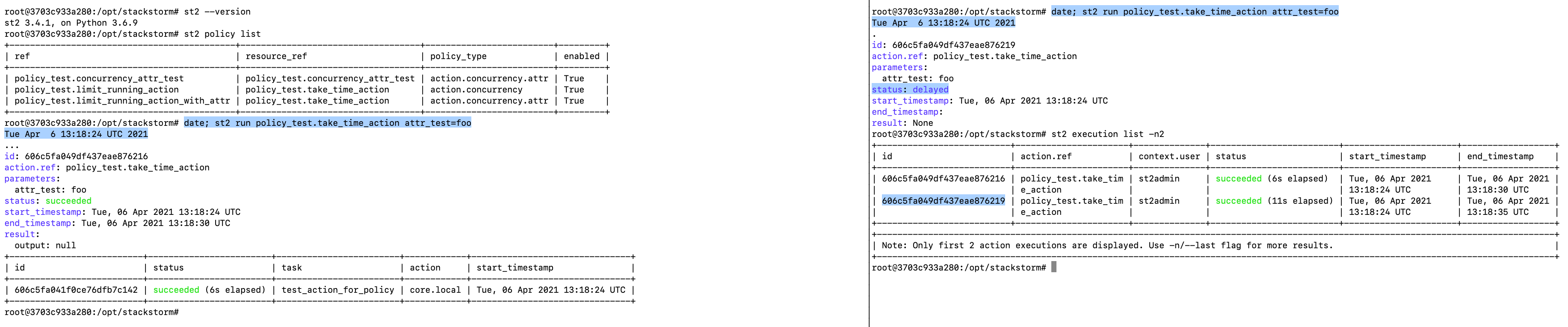
When multiple clinets run following actions at the same time
* (client-A) $ st2 run policy_test.take_time_action attr_test=foo
* (client-B) $ st2 run policy_test.take_time_action attr_test=foo
(c.f. policy_test.take_time_action)
in the st2 environment that sets following policies which specify same resource_ref of policy_test.take_time_action,
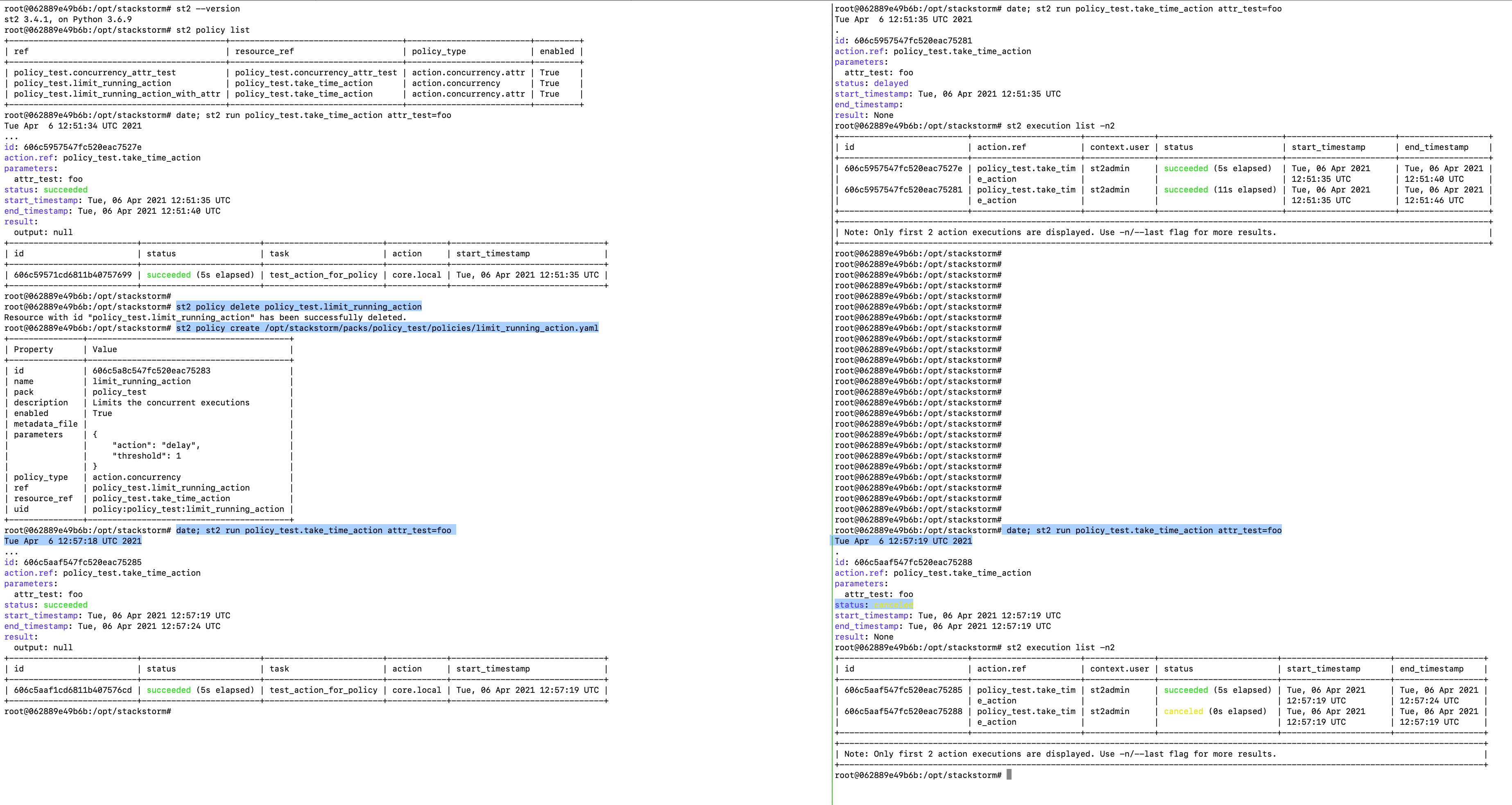
it's expected that
- the action of one side client (e.g. client-A) would be run normally.
- the action of other side client (e.g. client-B) would be canceled.
But, both action would be run (one client was delayed) like below.
Workaround
After deleting the policy policy_test.limit_running_action and registering it again, the problem won't be happened (this works expected as above) like following.
A way to reproduce
1. Running latest st2 docker
$ cd st2-docker
$ ST2_VERSION=latest docker-compose up -d
2. install policy_test pack for testing above
$ docker-compose exec st2client bash
# st2 pack install https://github.com/userlocalhost/st2-policy-test1.git
3. Run actions from multiple clients at the same time within 5 seconds
$ date; st2 run policy_test.take_time_action attr_test=foo
STACKSTORM VERSION

OS, environment, install method
user@localhost:~$ cat /etc/os-release
NAME="Ubuntu"
VERSION="18.04.5 LTS (Bionic Beaver)"
ID=ubuntu
ID_LIKE=debian
PRETTY_NAME="Ubuntu 18.04.5 LTS"
VERSION_ID="18.04"
HOME_URL="https://www.ubuntu.com/"
SUPPORT_URL="https://help.ubuntu.com/"
BUG_REPORT_URL="https://bugs.launchpad.net/ubuntu/"
PRIVACY_POLICY_URL="https://www.ubuntu.com/legal/terms-and-policies/privacy-policy"
VERSION_CODENAME=bionic
UBUNTU_CODENAME=bionic
user@localhost:~$ docker --version
Docker version 19.03.6, build 369ce74a3c
user@localhost:~$
Running by st2-docker as below
$ ST2_VERSION=latest docker-compose up -d
Contributor guide
First steps
- Read the whole issue, then the project's contributing guide.
- Comment on the issue to say you are picking it up — it saves two people doing the same work.
- Fork the repository and make your change on a branch.
- Open a pull request that references the issue number.
Research direction
Reproduce with st2-docker using policy_test and the two policies, policy_test.limit_running_action and policy_test.limit_running_action_with_attr, then run the concurrent st2 run commands. Compare behavior before and after deleting and re-registering the first policy; done means one action runs normally while the other is canceled and the attr-based policy is applied.
Written by the indexing model from the issue text.
Assessment
- Tech stack
- docker, docker-compose, python
- Domain
- backend, devops
- Issue type
- Bug
- Difficulty
- 4/5
- Estimated time
- 3-5 days
- Activity status
- Stale
- Clarity
- Mostly clear
- Newbie friendliness
- 42/100