StackExchange / StackExchange/Stacks-Editor
Non-breaking spaces are swallowed when toggling between Markdown and preview
Nobody has claimed this yet.
- Dominant language
- TypeScript
- Stars
- 437
- Forks
- 61
- Avg merge
- 16h 2m
- Merged PRs (30d)
- 8
Description
Steps to reproduce:
In Markdown mode, enter the following:
Hello

    This is indented

Good bye
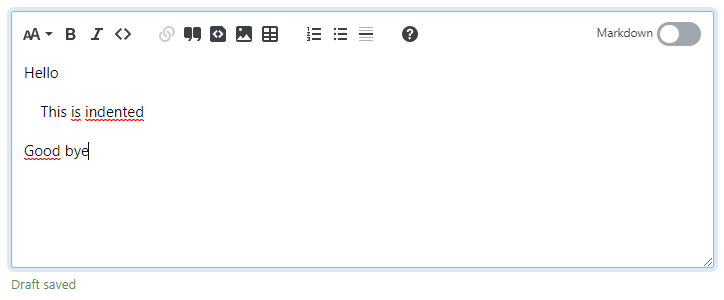
Toggle to preview/WYSIWYG mode, and it looks as expected:
Toggle back to Markdown mode, and you'll see the line is still indented, but no longer with HTML entities:
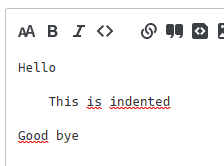
Even though it's not possible to tell visiually, the whitespace characters here are in fact U+00A0, not regular spaces.
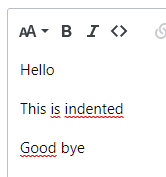
Now toggle back to preview mode, and the middle line is no longer indented.
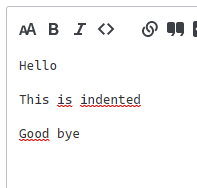
Now toggle back to Markdown mode and you'll see that there are no space characters of any kind "This is indented".
Chrome 102, Windows 11, using the editor in Stack Overflow for Teams
Contributor guide
First steps
- Read the whole issue, then the project's contributing guide.
- Comment on the issue to say you are picking it up — it saves two people doing the same work.
- Fork the repository and make your change on a branch.
- Open a pull request that references the issue number.
Research direction
No file or test is named. Reproduce the issue in the editor by toggling between Markdown and preview/WYSIWYG mode, then trace the Markdown-to-preview and preview-to-Markdown conversion paths. Done means repeated toggles preserve the non-breaking-space indentation and a regression test covers the reported example.
Written by the indexing model from the issue text.
Assessment
- Tech stack
- markdown, typescript
- Domain
- frontend, web-dev
- Issue type
- Bug
- Difficulty
- 3/5
- Estimated time
- 1-2 days
- Activity status
- Stale
- Clarity
- Mostly clear
- Newbie friendliness
- 45/100